全文搜索
全文搜索是一种在文本数据集中检索包含特定术语或短语的文档,然后根据相关性对结果进行排序的功能。该功能克服了语义搜索的局限性(语义搜索可能会忽略精确的术语),确保您获得最准确且与上下文最相关的结果。此外,它还通过接受原始文本输入来简化向量搜索,自动将您的文本数据转换为稀疏嵌入,而无需手动生成 Embedding。
该功能使用 BM25 算法进行相关性评分,在检索增强生成 (RAG) 场景中尤为重要,它能优先处理与特定搜索词密切匹配的文档。
说明 通过将全文搜索与基于语义的稠密向量搜索相结合,可以提高搜索结果的准确性和相关性。更多信息,请参阅混合搜索。
BM25 实施
Milvus 提供由 BM25 相关性算法驱动的全文搜索,BM25 是信息检索系统中广泛采用的评分功能,Milvus 将其集成到搜索工作流中,以提供准确的相关性排名文本结果。
Milvus 的全文搜索遵循以下工作流程:
-
原始文本输入:插入文本文档或使用纯文本提供查询,无需 Embedding 模型。
-
文本分析:Milvus 使用分析器将您的文本处理成可索引和搜索的有意义术语。
-
BM25 函数处理:一个内置函数可将这些术语转换为针对 BM25 评分优化的稀疏向量表示。
-
Collection 存储:Milvus 将生成的稀疏嵌入存储在一个 Collection 中,以便快速检索和排序。
-
BM25 相关性评分:在搜索时,Milvus 应用 BM25 评分函数计算文档相关性,并返回与查询词最匹配的排序结果。
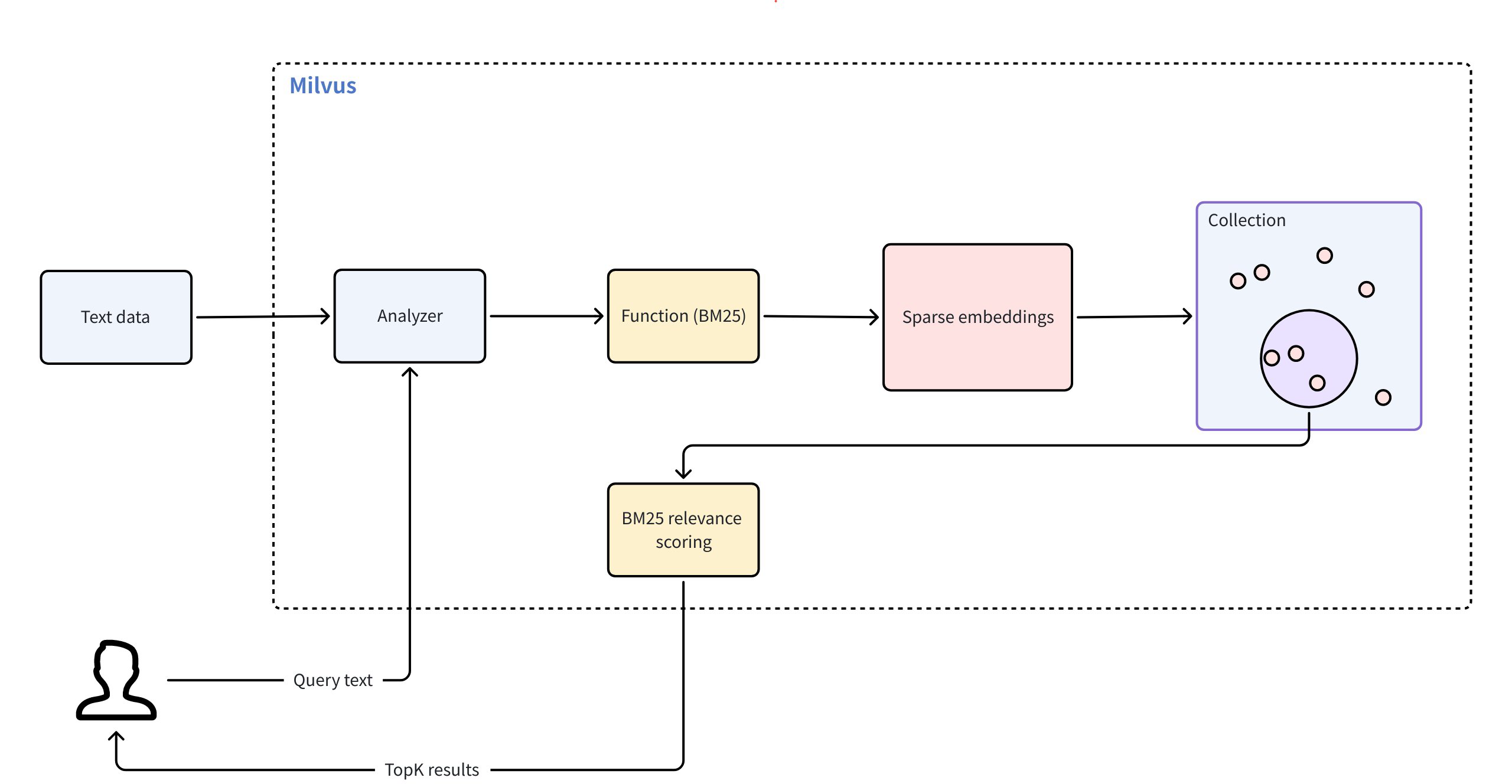 全文搜索
全文搜索
要使用全文搜索,请遵循以下主要步骤:
-
创建 Collection:设置所需字段并定义 BM25 函数,将原始文本转换为稀疏嵌入。
-
插入数据:将原始文本文档输入 Collection。
-
执行搜索:使用自然语言查询文本,根据 BM25 相关性检索排序结果。
为 BM25 全文搜索创建 Collection
要启用 BM25 支持的全文搜索,您必须准备一个包含所需字段的 Collection,定义一个 BM25 函数来生成稀疏向量,配置索引,然后创建 Collection。
定义 Schema 字段
您的 Collection Schema 必须包含至少三个必填字段:
-
主字段:唯一标识 Collection 中的每个实体。
-
文本字段(
VARCHAR):存储原始文本文档。必须设置enable_analyzer=True,以便 Milvus 处理文本,进行 BM25 相关性排序。默认情况下,Milvus 使用standard分析器进行文本分析。要配置不同的分析器,请参阅分析器概述。 -
稀疏向量字段(
SPARSE_FLOAT_VECTOR):存储由 BM25 函数自动生成的稀疏嵌入。
from pymilvus import MilvusClient, DataType, Function, FunctionType

client = MilvusClient(
    uri="http://localhost:19530",
    token="root:Milvus"
)

schema = client.create_schema()

schema.add_field(field_name="id", datatype=DataType.INT64, is_primary=True, auto_id=True) # Primary field
schema.add_field(field_name="text", datatype=DataType.VARCHAR, max_length=1000, enable_analyzer=True) # Text field
schema.add_field(field_name="sparse", datatype=DataType.SPARSE_FLOAT_VECTOR) # Sparse vector field; no dim required for sparse vectors
import io.milvus.v2.common.DataType;
import io.milvus.v2.service.collection.request.AddFieldReq;
import io.milvus.v2.service.collection.request.CreateCollectionReq;

CreateCollectionReq.CollectionSchema schema = CreateCollectionReq.CollectionSchema.builder()
        .build();
schema.addField(AddFieldReq.builder()
        .fieldName("id")
        .dataType(DataType.Int64)
        .isPrimaryKey(true)
        .autoID(true)
        .build());
schema.addField(AddFieldReq.builder()
        .fieldName("text")
        .dataType(DataType.VarChar)
        .maxLength(1000)
        .enableAnalyzer(true)
        .build());
schema.addField(AddFieldReq.builder()
        .fieldName("sparse")
        .dataType(DataType.SparseFloatVector)
        .build());
import (
    "context"
    "fmt"

    "github.com/milvus-io/milvus/client/v2/column"
    "github.com/milvus-io/milvus/client/v2/entity"
    "github.com/milvus-io/milvus/client/v2/index"
    "github.com/milvus-io/milvus/client/v2/milvusclient"
)

ctx, cancel := context.WithCancel(context.Background())
defer cancel()

milvusAddr := "localhost:19530"
client, err := milvusclient.New(ctx, &milvusclient.ClientConfig{
    Address: milvusAddr,
})
if err != nil {
    fmt.Println(err.Error())
    // handle error
}
defer client.Close(ctx)

schema := entity.NewSchema()
schema.WithField(entity.NewField().
    WithName("id").
    WithDataType(entity.FieldTypeInt64).
    WithIsPrimaryKey(true).
    WithIsAutoID(true),
).WithField(entity.NewField().
    WithName("text").
    WithDataType(entity.FieldTypeVarChar).
    WithEnableAnalyzer(true).
    WithMaxLength(1000),
).WithField(entity.NewField().
    WithName("sparse").
    WithDataType(entity.FieldTypeSparseVector),
)
import { MilvusClient, DataType } from "@zilliz/milvus2-sdk-node";

const address = "http://localhost:19530";
const token = "root:Milvus";
const client = new MilvusClient({address, token});
const schema = [
  {
    name: "id",
    data_type: DataType.Int64,
    is_primary_key: true,
  },
  {
    name: "text",
    data_type: "VarChar",
    enable_analyzer: true,
    enable_match: true,
    max_length: 1000,
  },
  {
    name: "sparse",
    data_type: DataType.SparseFloatVector,
  },
];

console.log(res.results)
export schema='{
        "autoId": true,
        "enabledDynamicField": false,
        "fields": [
            {
                "fieldName": "id",
                "dataType": "Int64",
                "isPrimary": true
            },
            {
                "fieldName": "text",
                "dataType": "VarChar",
                "elementTypeParams": {
                    "max_length": 1000,
                    "enable_analyzer": true
                }
            },
            {
                "fieldName": "sparse",
                "dataType": "SparseFloatVector"
            }
        ]
    }'
在前面的配置中、
-
id: 作为主键,由auto_id=True自动生成。 -
text:存储原始文本数据,用于全文搜索操作符。数据类型必须是VARCHAR,因为VARCHAR是用于文本存储的 Milvus 字符串数据类型。 -
sparse:一个向量字段,用于存储内部生成的稀疏嵌入,以进行全文搜索操作。数据类型必须是SPARSE_FLOAT_VECTOR。
定义 BM25 函数
BM25 函数将标记化文本转换为支持 BM25 评分的稀疏向量。
定义该函数并将其添加到 Schema 中:
bm25_function = Function(
    name="text_bm25_emb", # Function name
    input_field_names=["text"], # Name of the VARCHAR field containing raw text data
    output_field_names=["sparse"], # Name of the SPARSE_FLOAT_VECTOR field reserved to store generated embeddings
    function_type=FunctionType.BM25, # Set to `BM25`
)

schema.add_function(bm25_function)
import io.milvus.common.clientenum.FunctionType;
import io.milvus.v2.service.collection.request.CreateCollectionReq.Function;

import java.util.*;

schema.addFunction(Function.builder()
        .functionType(FunctionType.BM25)
        .name("text_bm25_emb")
        .inputFieldNames(Collections.singletonList("text"))
        .outputFieldNames(Collections.singletonList("sparse"))
        .build());
function := entity.NewFunction().
    WithName("text_bm25_emb").
    WithInputFields("text").
    WithOutputFields("sparse").
    WithType(entity.FunctionTypeBM25)
schema.WithFunction(function)
const functions = [
    {
      name: 'text_bm25_emb',
      description: 'bm25 function',
      type: FunctionType.BM25,
      input_field_names: ['text'],
      output_field_names: ['sparse'],
      params: {},
    },
];
export schema='{
        "autoId": true,
        "enabledDynamicField": false,
        "fields": [
            {
                "fieldName": "id",
                "dataType": "Int64",
                "isPrimary": true
            },
            {
                "fieldName": "text",
                "dataType": "VarChar",
                "elementTypeParams": {
                    "max_length": 1000,
                    "enable_analyzer": true
                }
            },
            {
                "fieldName": "sparse",
                "dataType": "SparseFloatVector"
            }
        ],
        "functions": [
            {
                "name": "text_bm25_emb",
                "type": "BM25",
                "inputFieldNames": ["text"],
                "outputFieldNames": ["sparse"],
                "params": {}
            }
        ]
    }'
| 参数
|
参数
| | --- | --- | |
name
|
函数名称。该函数将text 字段中的原始文本转换为 BM25 兼容的稀疏向量,这些稀疏向量将存储在sparse 字段中。
| |
input_field_names
|
需要将文本转换为稀疏向量的VARCHAR 字段的名称。对于FunctionType.BM25 ,该参数只接受一个字段名称。
| |
output_field_names
|
存储内部生成的稀疏向量的字段名称。对于FunctionType.BM25 ,该参数只接受一个字段名称。
| |
function_type
|
要使用的函数类型。必须为FunctionType.BM25 。
|
说明 如果多个
VARCHAR字段需要 BM25 处理,则为每个字段定义一个 BM25 函数,每个函数都有唯一的名称和输出字段。
配置索引
在定义了包含必要字段和内置函数的 Schema 后,请为您的 Collection 设置索引。
index_params = client.prepare_index_params()

index_params.add_index(
    field_name="sparse",

    index_type="SPARSE_INVERTED_INDEX",
    metric_type="BM25",
    params={
        "inverted_index_algo": "DAAT_MAXSCORE",
        "bm25_k1": 1.2,
        "bm25_b": 0.75
    }

)
import io.milvus.v2.common.IndexParam;

Map<String,Object> params = new HashMap<>();
params.put("inverted_index_algo", "DAAT_MAXSCORE");
params.put("bm25_k1", 1.2);
params.put("bm25_b", 0.75);

List<IndexParam> indexes = new ArrayList<>();
indexes.add(IndexParam.builder()
        .fieldName("sparse")
        .indexType(IndexParam.IndexType.AUTOINDEX)
        .metricType(IndexParam.MetricType.BM25)
        .extraParams(params)
        .build());
indexOption := milvusclient.NewCreateIndexOption("my_collection", "sparse",
    index.NewAutoIndex(entity.MetricType(entity.BM25)))
    .WithExtraParam("inverted_index_algo", "DAAT_MAXSCORE")
    .WithExtraParam("bm25_k1", 1.2)
    .WithExtraParam("bm25_b", 0.75)
const index_params = [
  {
    field_name: "sparse",
    metric_type: "BM25",
    index_type: "SPARSE_INVERTED_INDEX",
    params: {
        "inverted_index_algo": "DAAT_MAXSCORE",
        "bm25_k1": 1.2,
        "bm25_b": 0.75
    }
  },
];
export indexParams='[
        {
            "fieldName": "sparse",
            "metricType": "BM25",
            "indexType": "AUTOINDEX",
            "params":{
               "inverted_index_algo": "DAAT_MAXSCORE",
               "bm25_k1": 1.2,
               "bm25_b": 0.75
            }
        }
    ]'
| 参数
|
说明
| | --- | --- | |
field_name
|
要索引的向量字段的名称。对于全文搜索,这应该是存储生成的稀疏向量的字段。在本示例中,将值设为sparse 。
| |
index_type
|
要创建的索引类型。AUTOINDEX 允许 Milvus 自动优化索引设置。如果需要对索引设置进行更多控制,可以从 Milvus 中稀疏向量可用的各种索引类型中进行选择。更多信息,请参阅Milvus 支持的索引。
| |
metric_type
|
该参数的值必须设置为BM25 ,专门用于全文搜索功能。
| |
params
|
特定于索引的附加参数字典。
| |
params.inverted_index_algo
|
用于构建和查询索引的算法。有效值:
-
"DAAT_MAXSCORE"(默认):使用 MaxScore 算法优化的一次文档 (DAAT) 查询处理。MaxScore 通过跳过可能影响最小的术语和文档,为高k值或包含大量术语的查询提供更好的性能。为此,它根据最大影响分值将术语划分为基本组和非基本组,并将重点放在对前 k 结果有贡献的术语上。 -
"DAAT_WAND":使用 WAND 算法优化 DAAT 查询处理。WAND 算法利用最大影响得分跳过非竞争性文档,从而评估较少的命中文档,但每次命中的开销较高。这使得 WAND 对于k值较小的查询或较短的查询更有效,因为在这些情况下跳过更可行。 -
"TAAT_NAIVE":基本术语一次查询处理(TAAT)。虽然与DAAT_MAXSCORE和DAAT_WAND相比速度较慢,但TAAT_NAIVE具有独特的优势。DAAT 算法使用的是缓存的最大影响分数,无论全局 Collection 参数(avgdl)如何变化,这些分数都保持静态,而TAAT_NAIVE不同,它能动态地适应这种变化。
| |
params.bm25_k1
|
控制词频饱和度。数值越大,术语频率在文档排名中的重要性就越高。取值范围[1.2, 2.0].
| |
params.bm25_b
|
控制文档长度的标准化程度。通常使用 0 到 1 之间的值,默认值为 0.75 左右。值为 1 表示不进行长度归一化,值为 0 表示完全归一化。
|
创建 Collection
现在使用定义的 Schema 和索引参数创建 Collection。
client.create_collection(
    collection_name='my_collection',
    schema=schema,
    index_params=index_params
)
import io.milvus.v2.service.collection.request.CreateCollectionReq;

CreateCollectionReq requestCreate = CreateCollectionReq.builder()
        .collectionName("my_collection")
        .collectionSchema(schema)
        .indexParams(indexes)
        .build();
client.createCollection(requestCreate);
err = client.CreateCollection(ctx,
    milvusclient.NewCreateCollectionOption("my_collection", schema).
        WithIndexOptions(indexOption))
if err != nil {
    fmt.Println(err.Error())
    // handle error
}
await client.create_collection(
    collection_name: 'my_collection',
    schema: schema,
    index_params: index_params,
    functions: functions
);
export CLUSTER_ENDPOINT="http://localhost:19530"
export TOKEN="root:Milvus"

curl --request POST \
--url "${CLUSTER_ENDPOINT}/v2/vectordb/collections/create" \
--header "Authorization: Bearer ${TOKEN}" \
--header "Content-Type: application/json" \
--header "Request-Timeout: 10" \
-d "{
    \"collectionName\": \"my_collection\",
    \"schema\": $schema,
    \"indexParams\": $indexParams
}"
插入文本数据
设置好 Collection 和索引后,就可以插入文本数据了。在此过程中,您只需提供原始文本。我们之前定义的内置函数会为每个文本条目自动生成相应的稀疏向量。
client.insert('my_collection', [
    {'text': 'information retrieval is a field of study.'},
    {'text': 'information retrieval focuses on finding relevant information in large datasets.'},
    {'text': 'data mining and information retrieval overlap in research.'},
])
import com.google.gson.Gson;
import com.google.gson.JsonObject;

import io.milvus.v2.service.vector.request.InsertReq;

Gson gson = new Gson();
List<JsonObject> rows = Arrays.asList(
        gson.fromJson("{\"text\": \"information retrieval is a field of study.\"}", JsonObject.class),
        gson.fromJson("{\"text\": \"information retrieval focuses on finding relevant information in large datasets.\"}", JsonObject.class),
        gson.fromJson("{\"text\": \"data mining and information retrieval overlap in research.\"}", JsonObject.class)
);

client.insert(InsertReq.builder()
        .collectionName("my_collection")
        .data(rows)
        .build());
// go
await client.insert({
collection_name: 'my_collection',
data: [
    {'text': 'information retrieval is a field of study.'},
    {'text': 'information retrieval focuses on finding relevant information in large datasets.'},
    {'text': 'data mining and information retrieval overlap in research.'},
]);
curl --request POST \
--url "${CLUSTER_ENDPOINT}/v2/vectordb/entities/insert" \
--header "Authorization: Bearer ${TOKEN}" \
--header "Content-Type: application/json" \
--header "Request-Timeout: 10" \
-d '{
    "data": [
        {"text": "information retrieval is a field of study."},
        {"text": "information retrieval focuses on finding relevant information in large datasets."},
        {"text": "data mining and information retrieval overlap in research."}
    ],
    "collectionName": "my_collection"
}'
执行全文搜索
将数据插入 Collection 后,就可以使用原始文本查询执行全文搜索了。Milvus 会自动将你的查询转换成稀疏向量,并使用 BM25 算法对匹配的搜索结果进行排序,然后返回 topK (limit) 结果。
说明 你可以通过配置文本高亮器来高亮搜索结果中的匹配词。有关详情,请参阅文本高亮显示器。
res = client.search(
    collection_name='my_collection',
    data=['whats the focus of information retrieval?'],
    anns_field='sparse',
    output_fields=['text'], # Fields to return in search results; sparse field cannot be output
    limit=3,
)

print(res)
import io.milvus.v2.service.vector.request.SearchReq;
import io.milvus.v2.service.vector.request.data.EmbeddedText;
import io.milvus.v2.service.vector.response.SearchResp;

Map<String,Object> searchParams = new HashMap<>();

SearchResp searchResp = client.search(SearchReq.builder()
        .collectionName("my_collection")
        .data(Collections.singletonList(new EmbeddedText("whats the focus of information retrieval?")))
        .annsField("sparse")
        .topK(3)
        .searchParams(searchParams)
        .outputFields(Collections.singletonList("text"))
        .build());
annSearchParams := index.NewCustomAnnParam()
resultSets, err := client.Search(ctx, milvusclient.NewSearchOption(
    "my_collection", // collectionName
    3,               // limit
    []entity.Vector{entity.Text("whats the focus of information retrieval?")},
).WithConsistencyLevel(entity.ClStrong).
    WithANNSField("sparse").
    WithAnnParam(annSearchParams).
    WithOutputFields("text"))
if err != nil {
    fmt.Println(err.Error())
    // handle error
}

for _, resultSet := range resultSets {
    fmt.Println("IDs: ", resultSet.IDs.FieldData().GetScalars())
    fmt.Println("Scores: ", resultSet.Scores)
    fmt.Println("text: ", resultSet.GetColumn("text").FieldData().GetScalars())
}
await client.search(
    collection_name: 'my_collection',
    data: ['whats the focus of information retrieval?'],
    anns_field: 'sparse',
    output_fields: ['text'],
    limit: 3,
)
curl --request POST \
--url "${CLUSTER_ENDPOINT}/v2/vectordb/entities/search" \
--header "Authorization: Bearer ${TOKEN}" \
--header "Content-Type: application/json" \
--header "Request-Timeout: 10" \
--data-raw '{
    "collectionName": "my_collection",
    "data": [
        "whats the focus of information retrieval?"
    ],
    "annsField": "sparse",
    "limit": 3,
    "outputFields": [
        "text"
    ],
    "searchParams":{
        "params":{}
    }
}'
| 参数
|
说明
| | --- | --- | |
search_params
|
包含搜索参数的字典。
| |
params.drop_ratio_search
|
搜索时要忽略的低重要性词语的比例。详情请参阅稀疏向量。
| | | | |
data
|
自然语言原始查询文本。Milvus 使用 BM25 函数自动将您的文本查询转换为稀疏向量--请勿提供预先计算的向量。
| |
anns_field
|
包含内部生成的稀疏向量的字段名称。
| |
output_fields
|
在搜索结果中返回的字段名列表。支持除包含 BM25 生成的 Embedding 的稀疏向量字段外的所有字段。常见的输出字段包括主键字段(如id )和原始文本字段(如text )。更多信息请参阅常见问题。
| |
limit
|
返回的最大匹配次数。
|
常见问题
能否在全文搜索中输出或访问 BM25 函数生成的稀疏向量?
不能,BM25 函数生成的稀疏向量不能在全文搜索中直接访问或输出。详情如下:
-
BM25 函数在内部生成稀疏向量,用于排序和检索
-
这些向量存储在稀疏字段中,但不能包含在
output_fields -
您只能输出原始文本字段和元数据(如
id,text)。
举例说明:
# ❌ This throws an error - you cannot output the sparse field
client.search(
    collection_name='my_collection',
    data=['query text'],
    anns_field='sparse',
    output_fields=['text', 'sparse']  # 'sparse' causes an error
    limit=3,
    search_params=search_params
)

# ✅ This works - output text fields only
client.search(
    collection_name='my_collection',
    data=['query text'],
    anns_field='sparse',
    output_fields=['text']
    limit=3,
    search_params=search_params
)
既然无法访问稀疏向量字段,为什么还要定义它?
稀疏向量字段作为内部搜索索引,类似于用户不直接交互的数据库索引。
设计原理:
-
关注点分离:你处理文本(输入/输出),Milvus 处理向量(内部处理)
-
性能:预先计算的稀疏向量可在查询时快速进行 BM25 排序
-
用户体验:将复杂的向量操作符抽象为简单的文本界面
如果需要向量访问:
-
使用手动稀疏向量操作符代替全文搜索
-
为自定义稀疏向量工作流程创建单独的 Collection
详情请参考稀疏向量。