分析器概述
在文本处理中,分析器是将原始文本转换为结构化可搜索格式的关键组件。每个分析器通常由两个核心部件组成:标记器和过滤器。它们共同将输入文本转换为标记,完善这些标记,并为高效索引和检索做好准备。
在 Milvus 中,创建 Collection 时,将VARCHAR 字段添加到 Collection Schema 时,会对分析器进行配置。分析器生成的标记可用于建立关键字匹配索引,或转换为稀疏嵌入以进行全文搜索。有关详细信息,请参阅全文搜索、词组匹配或文本匹配。
使用分析器可能会影响性能:
-
全文搜索:对于全文搜索,数据节点和查询节点通道消耗数据的速度更慢,因为它们必须等待标记化完成。因此,新输入的数据需要更长的时间才能用于搜索。
-
**关键词匹配:**对于关键字匹配,索引创建速度也较慢,因为标记化需要在索引建立之前完成。
分析器剖析
Milvus 的分析器由一个标记化器和零个或多个过滤器组成。
-
标记化器:标记化器将输入文本分解为称为标记的离散单元。根据标记符类型的不同,这些标记符可以是单词或短语。
-
过滤器:可以对标记符进行过滤,进一步细化标记符,例如,使其小写或删除常用词。
标记符仅支持 UTF-8 格式。未来版本将增加对其他格式的支持。
下面的工作流程显示了分析器如何处理文本。
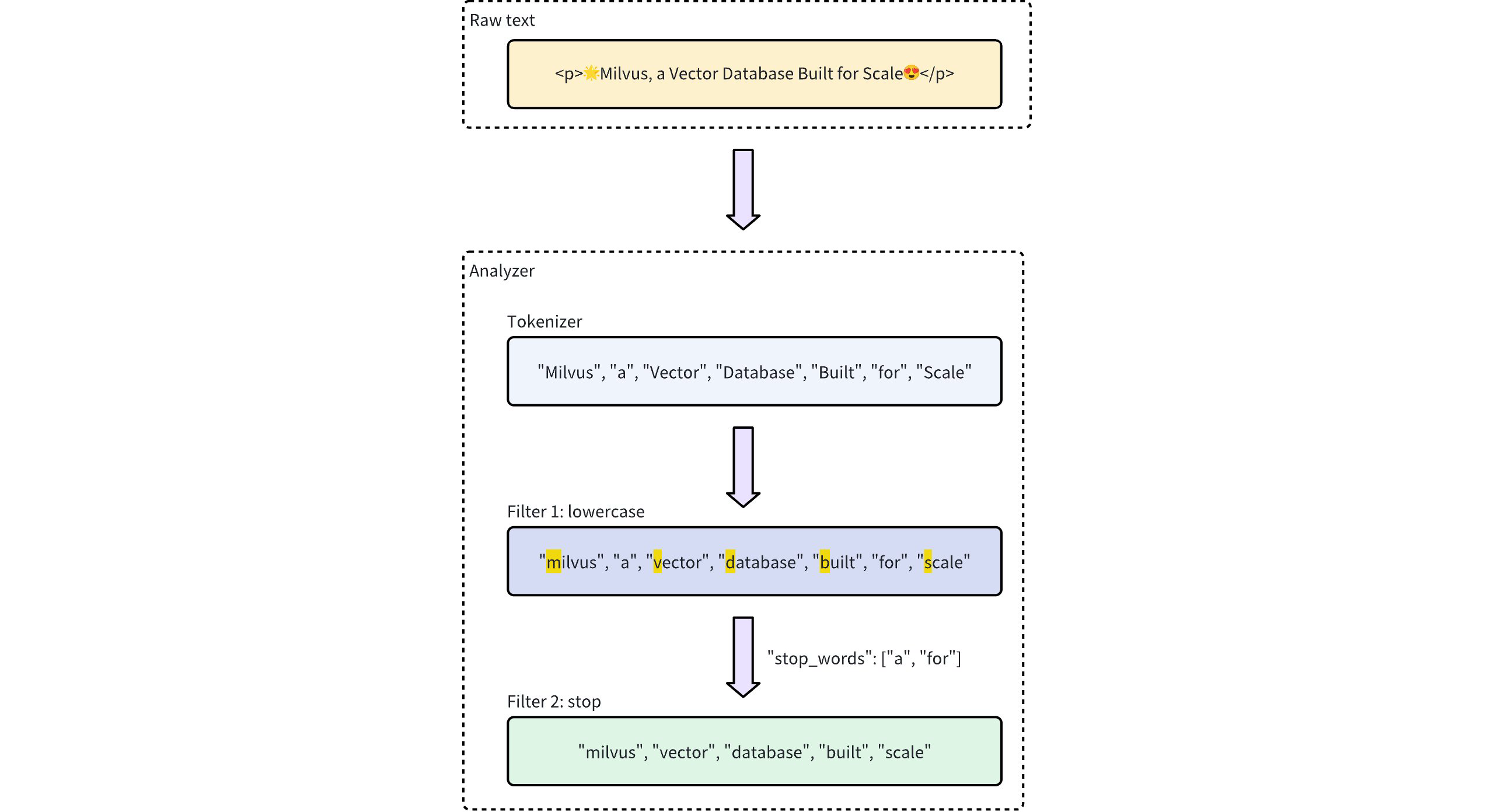 分析器处理工作流程
分析器类型
Milvus 提供两种类型的分析器,以满足不同的文本处理需求:
-
内置分析器:这些是预定义配置,只需最少的设置即可完成常见的文本处理任务。内置分析器无需复杂配置,是通用搜索的理想选择。
-
自定义分析器:对于更高级的要求,自定义分析器允许你通过指定标记器和零个或多个过滤器来定义自己的配置。这种自定义级别对于需要精确控制文本处理的特殊用例尤其有用。
内置分析器
Milvus 的内置分析器预先配置了特定的标记化器和过滤器,使您可以立即使用,而无需自己定义这些组件。每个内置分析器都是一个模板,包括预设的标记器和过滤器,以及用于自定义的可选参数。
例如,要使用standard 内置分析器,只需将其名称standard 指定为type ,并可选择包含该分析器类型特有的额外配置,如stop_words :
- Python
- Java
- NodeJS
- Go
- cURL
analyzer_params = {
    "type": "standard", # Uses the standard built-in analyzer
    "stop_words": ["a", "an", "for"] # Defines a list of common words (stop words) to exclude from tokenization
}
Map<String, Object> analyzerParams = new HashMap<>();
analyzerParams.put("type", "standard");
analyzerParams.put("stop_words", Arrays.asList("a", "an", "for"));
const analyzer_params = {
    "type": "standard", // Uses the standard built-in analyzer
    "stop_words": ["a", "an", "for"] // Defines a list of common words (stop words) to exclude from tokenization
};
analyzerParams := map[string]any{"type": "standard", "stop_words": []string{"a", "an", "for"}}
export analyzerParams='{
       "type": "standard",
       "stop_words": ["a", "an", "for"]
    }'
要检查分析器的执行结果,请使用run_analyzer 方法:
- Python
- Java
- NodeJS
- Go
- cURL
# Sample text to analyze
text = "An efficient system relies on a robust analyzer to correctly process text for various applications."

# Run analyzer
result = client.run_analyzer(
    text,
    analyzer_params
)
import io.milvus.v2.service.vector.request.RunAnalyzerReq;
import io.milvus.v2.service.vector.response.RunAnalyzerResp;

List<String> texts = new ArrayList<>();
texts.add("An efficient system relies on a robust analyzer to correctly process text for various applications.");

RunAnalyzerResp resp = client.runAnalyzer(RunAnalyzerReq.builder()
        .texts(texts)
        .analyzerParams(analyzerParams)
        .build());
List<RunAnalyzerResp.AnalyzerResult> results = resp.getResults();
// javascrip# Sample text to analyze
const text = "An efficient system relies on a robust analyzer to correctly process text for various applications."

// Run analyzer
const result = await client.run_analyzer({
    text,
    analyzer_params
});
import (
    "context"
    "encoding/json"
    "fmt"

    "github.com/milvus-io/milvus/client/v2/milvusclient"
)

bs, _ := json.Marshal(analyzerParams)
texts := []string{"An efficient system relies on a robust analyzer to correctly process text for various applications."}
option := milvusclient.NewRunAnalyzerOption(texts).
    WithAnalyzerParams(string(bs))

result, err := client.RunAnalyzer(ctx, option)
if err != nil {
    fmt.Println(err.Error())
    // handle error
}
# restful
输出结果将是
['efficient', 'system', 'relies', 'on', 'robust', 'analyzer', 'to', 'correctly', 'process', 'text', 'various', 'applications']
这表明分析器正确地对输入文本进行了标记化处理,过滤掉了停止词"a" 、"an" 和"for" ,同时返回了其余有意义的标记。
上述standard 内置分析器的配置等同于使用以下参数设置自定义分析器,其中tokenizer 和filter 选项是为实现类似功能而明确定义的:
- Python
- Java
- NodeJS
- Go
- cURL
analyzer_params = {
    "tokenizer": "standard",
    "filter": [
        "lowercase",
        {
            "type": "stop",
            "stop_words": ["a", "an", "for"]
        }
    ]
}
Map<String, Object> analyzerParams = new HashMap<>();
analyzerParams.put("tokenizer", "standard");
analyzerParams.put("filter",
        Arrays.asList("lowercase",
                new HashMap<String, Object>() {{
                    put("type", "stop");
                    put("stop_words", Arrays.asList("a", "an", "for"));
                }}));
const analyzer_params = {
    "tokenizer": "standard",
    "filter": [
        "lowercase",
        {
            "type": "stop",
            "stop_words": ["a", "an", "for"]
        }
    ]
};
analyzerParams = map[string]any{"tokenizer": "standard",
    "filter": []any{"lowercase", map[string]any{
        "type":       "stop",
        "stop_words": []string{"a", "an", "for"},
    }}}
export analyzerParams='{
       "type": "standard",
       "filter":  [
       "lowercase",
       {
            "type": "stop",
            "stop_words": ["a", "an", "for"]
       }
   ]
}'
Milvus 提供以下内置分析器,每个分析器都是为特定文本处理需求而设计的:
-
standard:适用于通用文本处理,应用标准标记化和小写过滤。 -
english:针对英语文本进行了优化,支持英语停止词。 -
chinese:专门用于处理中文文本,包括针对中文语言结构的标记化。
自定义分析器
对于更高级的文本处理,Milvus 中的自定义分析器允许您通过指定标记符号化器和过滤器来建立一个定制的文本处理管道。这种设置非常适合需要精确控制的特殊用例。
标记器
标记化器是自定义分析器的必备组件,它通过将输入文本分解为离散单元或标记来启动分析器管道。标记化遵循特定的规则,例如根据标记化器的类型用空白或标点符号分割。这一过程可以更精确、更独立地处理每个单词或短语。
例如,标记化器会将文本"Vector Database Built for Scale" 转换为单独的标记:
["Vector", "Database", "Built", "for", "Scale"]
指定标记符的示例:
- Python
- Java
- NodeJS
- Go
- cURL
analyzer_params = {
    "tokenizer": "whitespace",
}
Map<String, Object> analyzerParams = new HashMap<>();
analyzerParams.put("tokenizer", "whitespace");
const analyzer_params = {
    "tokenizer": "whitespace",
};
analyzerParams = map[string]any{"tokenizer": "whitespace"}
export analyzerParams='{
       "type": "whitespace"
    }'
过滤器
过滤器是可选组件,用于处理标记化器生成的标记,根据需要对其进行转换或细化。例如,在对标记化术语["Vector", "Database", "Built", "for", "Scale"] 应用lowercase 过滤器后,结果可能是:
["vector", "database", "built", "for", "scale"]
自定义分析器中的过滤器可以是内置的,也可以是自定义的,具体取决于配置需求。
-
内置过滤器:由 Milvus 预先配置,只需最少的设置。您只需指定过滤器的名称,就能立即使用这些过滤器。以下是可直接使用的内置过滤器:
-
lowercase:将文本转换为小写,确保不区分大小写进行匹配。有关详情,请参阅小写。 -
asciifolding:将非 ASCII 字符转换为 ASCII 对应字符,简化多语言文本处理。有关详情,请参阅ASCII 折叠。 -
alphanumonly:只保留字母数字字符,删除其他字符。有关详情,请参阅Alphanumonly。 -
cnalphanumonly:删除包含除汉字、英文字母或数字以外的任何字符的标记。有关详情,请参阅Cnalphanumonly。 -
cncharonly:删除包含任何非汉字的标记。详情请参阅Cncharonly。
使用内置过滤器的示例:
- Python
- Java
- NodeJS
- Go
- cURL
analyzer_params = {
    "tokenizer": "standard", # Mandatory: Specifies tokenizer
    "filter": ["lowercase"], # Optional: Built-in filter that converts text to lowercase
}Map<String, Object> analyzerParams = new HashMap<>();
analyzerParams.put("tokenizer", "standard");
analyzerParams.put("filter", Collections.singletonList("lowercase"));const analyzer_params = {
"tokenizer": "standard", // Mandatory: Specifies tokenizer
"filter": ["lowercase"], // Optional: Built-in filter that converts text to lowercase
}analyzerParams = map[string]any{"tokenizer": "standard",
"filter": []any{"lowercase"}}export analyzerParams='{
"type": "standard",
"filter": ["lowercase"]
}' -
-
自定义过滤器:自定义过滤器允许进行专门配置。您可以通过选择有效的过滤器类型 (
filter.type) 并为每种过滤器类型添加特定设置来定义自定义过滤器。支持自定义的过滤器类型示例:-
stop:通过设置停止词列表(如"stop_words": ["of", "to"])删除指定的常用词。有关详情,请参阅停止。 -
length:根据长度标准(如设置最大标记长度)排除标记。详情请参阅长度。 -
stemmer:将单词还原为词根形式,以便更灵活地进行匹配。详情请参阅词根。
配置自定义过滤器的示例:
- Python
- Java
- NodeJS
- Go
- cURL
analyzer_params = {
    "tokenizer": "standard", # Mandatory: Specifies tokenizer
    "filter": [
        {
            "type": "stop", # Specifies 'stop' as the filter type
            "stop_words": ["of", "to"], # Customizes stop words for this filter type
        }
    ]
}Map<String, Object> analyzerParams = new HashMap<>();
analyzerParams.put("tokenizer", "standard");
analyzerParams.put("filter",
Collections.singletonList(new HashMap<String, Object>() {{
put("type", "stop");
put("stop_words", Arrays.asList("a", "an", "for"));
}}));const analyzer_params = {
"tokenizer": "standard", // Mandatory: Specifies tokenizer
"filter": [
{
"type": "stop", // Specifies 'stop' as the filter type
"stop_words": ["of", "to"], // Customizes stop words for this filter type
}
]
};analyzerParams = map[string]any{"tokenizer": "standard",
"filter": []any{map[string]any{
"type": "stop",
"stop_words": []string{"of", "to"},
}}}export analyzerParams='{
"type": "standard",
"filter": [
{
"type": "stop",
"stop_words": ["a", "an", "for"]
}
]
}' -
使用示例
在本示例中,您将创建一个 Collection Schema,其中包括:
-
一个用于嵌入的向量字段。
-
两个
VARCHAR字段,用于文本处理:-
一个字段使用内置分析器。
-
其他字段使用自定义分析器。
-
在将这些配置并入 Collection 之前,你将使用run_analyzer 方法验证每个分析器。
步骤 1:初始化 MilvusClient 并创建 Schema
首先设置 Milvus 客户端并创建新模式。
- Python
- Java
- NodeJS
- Go
- cURL
from pymilvus import MilvusClient, DataType

# Set up a Milvus client
client = MilvusClient(uri="http://localhost:19530")

# Create a new schema
schema = client.create_schema(auto_id=True, enable_dynamic_field=False)
import io.milvus.v2.client.ConnectConfig;
import io.milvus.v2.client.MilvusClientV2;
import io.milvus.v2.common.DataType;
import io.milvus.v2.common.IndexParam;
import io.milvus.v2.service.collection.request.AddFieldReq;
import io.milvus.v2.service.collection.request.CreateCollectionReq;

// Set up a Milvus client
ConnectConfig config = ConnectConfig.builder()
        .uri("http://localhost:19530")
        .build();
MilvusClientV2 client = new MilvusClientV2(config);

// Create schema
CreateCollectionReq.CollectionSchema schema = CreateCollectionReq.CollectionSchema.builder()
        .enableDynamicField(false)
        .build();
import { MilvusClient, DataType } from "@zilliz/milvus2-sdk-node";

// Set up a Milvus client
const client = new MilvusClient("http://localhost:19530");
import (
    "context"
    "fmt"

    "github.com/milvus-io/milvus/client/v2/column"
    "github.com/milvus-io/milvus/client/v2/entity"
    "github.com/milvus-io/milvus/client/v2/index"
    "github.com/milvus-io/milvus/client/v2/milvusclient"
)

ctx, cancel := context.WithCancel(context.Background())
defer cancel()

cli, err := milvusclient.New(ctx, &milvusclient.ClientConfig{
    Address: "localhost:19530",
})
if err != nil {
    fmt.Println(err.Error())
    // handle err
}
defer client.Close(ctx)

schema := entity.NewSchema().WithAutoID(true).WithDynamicFieldEnabled(false)
# restful
第 2 步:定义并验证分析器配置
-
配置并验证内置分析器(
english):-
**配置:**为内置英文分析器定义分析器参数。
-
**验证:**使用
run_analyzer检查配置是否产生了预期的标记化。
- Python
- Java
- NodeJS
- Go
- cURL
# Built-in analyzer configuration for English text processing
analyzer_params_built_in = {
    "type": "english"
}

# Verify built-in analyzer configuration
sample_text = "Milvus simplifies text analysis for search."
result = client.run_analyzer(sample_text, analyzer_params_built_in)
print("Built-in analyzer output:", result)

# Expected output:
# Built-in analyzer output: ['milvus', 'simplifi', 'text', 'analysi', 'search']Map<String, Object> analyzerParamsBuiltin = new HashMap<>();
analyzerParamsBuiltin.put("type", "english");
List<String> texts = new ArrayList<>();
texts.add("Milvus simplifies text ana
lysis for search.");
RunAnalyzerResp resp = client.runAnalyzer(RunAnalyzerReq.builder()
.texts(texts)
.analyzerParams(analyzerParams)
.build());
List<RunAnalyzerResp.AnalyzerResult> results = resp.getResults();// Use a built-in analyzer for VARCHAR field `title_en`
const analyzerParamsBuiltIn = {
type: "english",
};
const sample_text = "Milvus simplifies text analysis for search.";
const result = await client.run_analyzer({
text: sample_text,
analyzer_params: analyzer_params_built_in
});analyzerParams := map[string]any{"type": "english"}
bs, _ := json.Marshal(analyzerParams)
texts := []string{"Milvus simplifies text analysis for search."}
option := milvusclient.NewRunAnalyzerOption(texts).
WithAnalyzerParams(string(bs))
result, err := client.RunAnalyzer(ctx, option)
if err != nil {
fmt.Println(err.Error())
// handle error
}# restful -
-
配置和验证自定义分析器:
-
**配置:**定义一个自定义分析器,该分析器使用标准标记化器、内置小写过滤器以及针对标记长度和停用词的自定义过滤器。
-
**验证:**使用
run_analyzer确保自定义配置按预期处理文本。
- Python
- Java
- NodeJS
- Go
- cURL
# Custom analyzer configuration with a standard tokenizer and custom filters
analyzer_params_custom = {
    "tokenizer": "standard",
    "filter": [
        "lowercase",  # Built-in filter: convert tokens to lowercase
        {
            "type": "length",  # Custom filter: restrict token length
            "max": 40
        },
        {
            "type": "stop",  # Custom filter: remove specified stop words
            "stop_words": ["of", "for"]
        }
    ]
}

# Verify custom analyzer configuration
sample_text = "Milvus provides flexible, customizable analyzers for robust text processing."
result = client.run_analyzer(sample_text, analyzer_params_custom)
print("Custom analyzer output:", result)

# Expected output:
# Custom analyzer output: ['milvus', 'provides', 'flexible', 'customizable', 'analyzers', 'robust', 'text', 'processing']
// Configure a custom analyzer
Map<String, Object> analyzerParams = new HashMap<>();
analyzerParams.put("tokenizer", "standard");
analyzerParams.put("filter",
Arrays.asList("lowercase",
new HashMap<String, Object>() {{
put("type", "length");
put("max", 40);
}},
new HashMap<String, Object>() {{
put("type", "stop");
put("stop_words", Arrays.asList("of", "for"));
}}
)
);
List<String> texts = new ArrayList<>();
texts.add("Milvus provides flexible, customizable analyzers for robust text processing.");
RunAnalyzerResp resp = client.runAnalyzer(RunAnalyzerReq.builder()
.texts(texts)
.analyzerParams(analyzerParams)
.build());
List<RunAnalyzerResp.AnalyzerResult> results = resp.getResults();// Configure a custom analyzer for VARCHAR field `title`
const analyzerParamsCustom = {
tokenizer: "standard",
filter: [
"lowercase",
{
type: "length",
max: 40,
},
{
type: "stop",
stop_words: ["of", "to"],
},
],
};
const sample_text = "Milvus provides flexible, customizable analyzers for robust text processing.";
const result = await client.run_analyzer({
text: sample_text,
analyzer_params: analyzer_params_built_in
});analyzerParams = map[string]any{"tokenizer": "standard",
"filter": []any{"lowercase",
map[string]any{
"type": "length",
"max": 40,
map[string]any{
"type": "stop",
"stop_words": []string{"of", "to"},
}}}
bs, _ := json.Marshal(analyzerParams)
texts := []string{"Milvus provides flexible, customizable analyzers for robust text processing."}
option := milvusclient.NewRunAnalyzerOption(texts).
WithAnalyzerParams(string(bs))
result, err := client.RunAnalyzer(ctx, option)
if err != nil {
fmt.Println(err.Error())
// handle error
}# curl -
第 3 步:向 Schema 添加字段
验证分析器配置后,将其添加到 Schema 字段中:
- Python
- Java
- NodeJS
- Go
- cURL
# Add VARCHAR field 'title_en' using the built-in analyzer configuration
schema.add_field(
    field_name='title_en',
    datatype=DataType.VARCHAR,
    max_length=1000,
    enable_analyzer=True,
    analyzer_params=analyzer_params_built_in,
    enable_match=True,
)

# Add VARCHAR field 'title' using the custom analyzer configuration
schema.add_field(
    field_name='title',
    datatype=DataType.VARCHAR,
    max_length=1000,
    enable_analyzer=True,
    analyzer_params=analyzer_params_custom,
    enable_match=True,
)

# Add a vector field for embeddings
schema.add_field(field_name="embedding", datatype=DataType.FLOAT_VECTOR, dim=3)

# Add a primary key field
schema.add_field(field_name="id", datatype=DataType.INT64, is_primary=True)
schema.addField(AddFieldReq.builder()
        .fieldName("title")
        .dataType(DataType.VarChar)
        .maxLength(1000)
        .enableAnalyzer(true)
        .analyzerParams(analyzerParams)
        .enableMatch(true) // must enable this if you use TextMatch
        .build());

// Add vector field
schema.addField(AddFieldReq.builder()
        .fieldName("embedding")
        .dataType(DataType.FloatVector)
        .dimension(3)
        .build());
// Add primary field
schema.addField(AddFieldReq.builder()
        .fieldName("id")
        .dataType(DataType.Int64)
        .isPrimaryKey(true)
        .autoID(true)
        .build());
// Create schema
const schema = {
  auto_id: true,
  fields: [
    {
      name: "id",
      type: DataType.INT64,
      is_primary: true,
    },
    {
      name: "title_en",
      data_type: DataType.VARCHAR,
      max_length: 1000,
      enable_analyzer: true,
      analyzer_params: analyzerParamsBuiltIn,
      enable_match: true,
    },
    {
      name: "title",
      data_type: DataType.VARCHAR,
      max_length: 1000,
      enable_analyzer: true,
      analyzer_params: analyzerParamsCustom,
      enable_match: true,
    },
    {
      name: "embedding",
      data_type: DataType.FLOAT_VECTOR,
      dim: 4,
    },
  ],
};
schema.WithField(entity.NewField().
    WithName("id").
    WithDataType(entity.FieldTypeInt64).
    WithIsPrimaryKey(true).
    WithIsAutoID(true),
).WithField(entity.NewField().
    WithName("embedding").
    WithDataType(entity.FieldTypeFloatVector).
    WithDim(3),
).WithField(entity.NewField().
    WithName("title").
    WithDataType(entity.FieldTypeVarChar).
    WithMaxLength(1000).
    WithEnableAnalyzer(true).
    WithAnalyzerParams(analyzerParams).
    WithEnableMatch(true),
)
# restful
第 4 步:准备索引参数并创建 Collection
- Python
- Java
- NodeJS
- Go
- cURL
# Set up index parameters for the vector field
index_params = client.prepare_index_params()
index_params.add_index(field_name="embedding", metric_type="COSINE", index_type="AUTOINDEX")

# Create the collection with the defined schema and index parameters
client.create_collection(
    collection_name="my_collection",
    schema=schema,
    index_params=index_params
)
// Set up index params for vector field
List<IndexParam> indexes = new ArrayList<>();
indexes.add(IndexParam.builder()
        .fieldName("embedding")
        .indexType(IndexParam.IndexType.AUTOINDEX)
        .metricType(IndexParam.MetricType.COSINE)
        .build());

// Create collection with defined schema
CreateCollectionReq requestCreate = CreateCollectionReq.builder()
        .collectionName("my_collection")
        .collectionSchema(schema)
        .indexParams(indexes)
        .build();
client.createCollection(requestCreate);
// Set up index params for vector field
const indexParams = [
  {
    name: "embedding",
    metric_type: "COSINE",
    index_type: "AUTOINDEX",
  },
];

// Create collection with defined schema
await client.createCollection({
  collection_name: "my_collection",
  schema: schema,
  index_params: indexParams,
});

console.log("Collection created successfully!");
idx := index.NewAutoIndex(index.MetricType(entity.COSINE))
indexOption := milvusclient.NewCreateIndexOption("my_collection", "embedding", idx)

err = client.CreateCollection(ctx,
    milvusclient.NewCreateCollectionOption("my_collection", schema).
        WithIndexOptions(indexOption))
if err != nil {
    fmt.Println(err.Error())
    // handle error
}
# restful
下一步
配置分析器后,您就可以集成 Milvus 提供的文本检索功能。详情请看