使用 mmap
内存映射(Mmap)可实现对磁盘上大型文件的直接内存访问,使 Milvus 可以在内存和硬盘中同时存储索引和数据。这种方法有助于根据访问频率优化数据放置策略,在不明显影响搜索性能的情况下扩大 Collection 的存储容量。本页将帮助你了解 Milvus 如何使用 mmap 来实现快速高效的数据存储和检索。
概述
Milvus 使用 Collection 来组织 Embedding 及其元数据,而 Collection 中的每一行都代表一个实体。如下左图所示,向量字段存储 Embedding,标量字段存储其元数据。当你在某些字段上创建了索引并加载了 Collection 后,Milvus 会将创建的索引和字段原始数据加载到内存中。
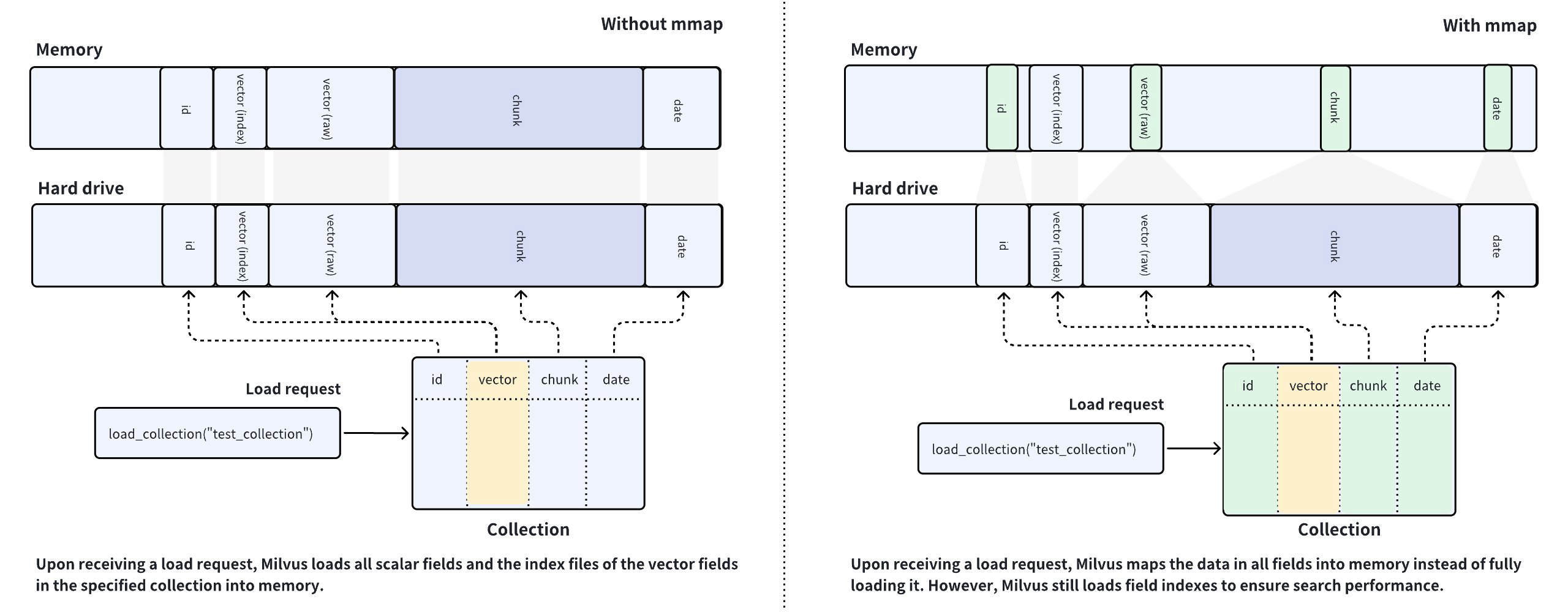 Mmap 图解
Milvus 是内存稠密数据库系统,可用内存大小决定了 Collection 的容量。如果数据量超过内存容量,就无法将包含大量数据的字段加载到内存中,而人工智能驱动的应用程序通常就是这种情况。
为了解决此类问题,Milvus 引入了 mmap 来平衡 Collection 中冷热数据的加载。如上右图所示,你可以配置 Milvus 对某些字段中的原始数据进行内存映射,而不是将它们完全加载到内存中。这样,你就可以直接获得字段的内存访问权限,而不必担心内存问题,并扩展了 Collection 的容量。
通过比较左右两幅图中的数据放置程序,可以发现左图中的内存使用量要比右图中高得多。启用 mmap 后,本应加载到内存中的数据会被卸载到硬盘中,并缓存到操作系统的页面缓存中,从而减少内存占用。不过,缓存命中失败可能会导致性能下降。有关详细信息,请参阅本文。
在 milvus 上配置 mmap 时,总有一个原则需要大家遵守:始终保持频繁访问的数据和索引完全加载到内存中,并对剩余字段中的数据和索引使用 mmap。
在 Milvus 中使用 mmap
Milvus 在全局、字段、索引和 Collection 层面提供分层 mmap 设置,其中索引和字段层级优先于 Collection 层级,而 Collection 层级优先于全局层级。
全局 mmap 设置
集群级设置是全局设置,优先级最低。Milvus 在milvus.yaml 中提供了多个 mmap 相关设置。这些设置将适用于群集中的所有 Collection。
...
queryNode:
  mmap:
    scalarField: false
    scalarIndex: false
    vectorField: false
    vectorIndex: false
    # The following should be a path on a high-performance disk
    mmapDirPath: any/valid/path
....
| 配置 项目
|
默认值
|
默认值
| | --- | --- | --- | |
queryNode.mmap.scalarField
|
指定是否将所有标量字段的原始数据映射到内存中。将此设置为true 时,Milvus 会将 Collection 标量字段数据的原始数据映射到内存中,而不是在收到针对此 Collection 的加载请求时完全加载。
|
false
| |
queryNode.mmap.scalarIndex
|
指定是否将所有标量字段索引映射到内存中。将其设置为true 会使 Milvus 在收到针对某个 Collection 的加载请求时,将该 Collection 的标量字段索引映射到内存中,而不是完全加载它们。
目前,只支持使用以下索引类型的标量字段:
- 反转
|
false
| |
queryNode.mmap.vectorField
|
指定是否将所有向量字段的原始数据映射到内存中。将此设置为true 会使 Milvus 在收到针对该 Collection 的加载请求时,将该 Collection 向量字段数据的原始数据映射到内存中,而不是完全加载。
|
false
| |
queryNode.mmap.vectorIndex
|
指定是否将所有向量字段索引映射到内存中。将其设置为true 会使 Milvus 在收到针对某个 Collection 的加载请求时,将该 Collection 的向量字段索引映射到内存中,而不是完全加载它们。
目前,只支持使用以下索引类型的向量字段:
-
平面
-
IVF_FLAT
-
IVF_SQ8
-
IVF_PQ
-
BIN_FLAT
-
BIN_IVF_FLAT
-
HNSW
-
SCANN
-
稀疏反转索引
-
SPARSE_WAND
|
false
| |
queryNode.mmap.mmapDirPath
|
指定内存映射文件的路径。如果未指定,则使用默认值。
默认值中的localStorage.path 占位符表示 Milvus QueryNodes 的硬盘驱动器。请确保您的 QueryNodes 拥有高性能硬盘,以获得最佳的内存映射优势。
|
{localStorage.path}/mmap
|
要将上述设置应用到你的 Milvus 集群,请按照《使用 Helm 配置 Milvus》和《使用 Milvus 操作符 配置 Milvus》中的步骤操作。
有时,全局 mmap 设置在面对特定用例时不够灵活。要将备用设置应用于特定 Collection 或其索引,可以考虑配置特定于某个 Collection、某个字段或某个索引的 mmap。在对 mmap 设置的更改生效前,需要释放并加载 Collection。
特定字段的 mmap 设置
要配置特定于字段的 mmap,需要在添加字段时包含mmap_enabled 参数。通过将该参数设置为True ,可以在特定字段上启用 mmap。
下面的示例演示了如何在添加字段时配置特定于字段的 mmap。
from pymilvus import MilvusClient, DataType

CLUSTER_ENDPOINT="http://localhost:19530"
TOKEN="root:Milvus"

client = MilvusClient(
    uri=CLUSTER_ENDPOINT,
    token=TOKEN
)

schema = MilvusClient.create_schema()
schema.add_field("id", DataType.INT64, is_primary=True, auto_id=False)
schema.add_field("vector", DataType.FLOAT_VECTOR, dim=5)

schema = MilvusClient.create_schema()

# Add a scalar field and enable mmap
schema.add_field(
    field_name="doc_chunk",
    datatype=DataType.INT64,
    is_primary=True,
    mmap_enabled=True,
)

# Alter mmap settings on a specific field
# The following assumes that you have a collection named `my_collection`
client.alter_collection_field(
    collection_name="my_collection",
    field_name="doc_chunk",
    field_params={"mmap.enabled": True}
)
import io.milvus.param.Constant;
import io.milvus.v2.client.ConnectConfig;
import io.milvus.v2.client.MilvusClientV2;
import io.milvus.v2.common.DataType;
import io.milvus.v2.service.collection.request.*;

import java.util.*;

String CLUSTER_ENDPOINT = "http://localhost:19530";
String TOKEN = "root:Milvus";
client = new MilvusClientV2(ConnectConfig.builder()
        .uri(CLUSTER_ENDPOINT)
        .token(TOKEN)
        .build());

CreateCollectionReq.CollectionSchema schema = client.createSchema();

schema.addField(AddFieldReq.builder()
        .fieldName("id")
        .dataType(DataType.Int64)
        .isPrimaryKey(true)
        .autoID(false)
        .build());

schema.addField(AddFieldReq.builder()
        .fieldName("vector")
        .dataType(DataType.FloatVector)
        .dimension(5)
        .build());

Map<String, String> typeParams = new HashMap<String, String>() {{
    put(Constant.MMAP_ENABLED, "false");
}};
schema.addField(AddFieldReq.builder()
        .fieldName("doc_chunk")
        .dataType(DataType.VarChar)
        .maxLength(512)
        .typeParams(typeParams)
        .build());

CreateCollectionReq req = CreateCollectionReq.builder()
        .collectionName("my_collection")
        .collectionSchema(schema)
        .build();
client.createCollection(req);

client.alterCollectionField(AlterCollectionFieldReq.builder()
        .collectionName("my_collection")
        .fieldName("doc_chunk")
        .property(Constant.MMAP_ENABLED, "true")
        .build());
import { MilvusClient, DataType } from '@zilliz/milvus2-sdk-node';

const CLUSTER_ENDPOINT="YOUR_CLUSTER_ENDPOINT";
const TOKEN="YOUR_TOKEN";

const client = await MilvusClient({
    address: CLUSTER_ENDPOINT,
    token: TOKEN
});

const schema = [
{
    name: 'vector',
    data_type: DataType.FloatVector
},
{
    name: "doc_chunk",
    data_type: DataType.VarChar,
    max_length: 512,
    'mmap.enabled': false,
}
];

await client.createCollection({
    collection_name: "my_collection",
    schema: schema
});

await client.alterCollectionFieldProperties({
    collection_name: "my_collection",
    field_name: "doc_chunk",
    properties: {"mmap_enable": true}
});
// go
#restful
export TOKEN="root:Milvus"
export CLUSTER_ENDPOINT="http://localhost:19530"

export idField='{
    "fieldName": "id",
    "dataType": "Int64",
    "elementTypeParams": {
        "max_length": 512
    },
    "isPrimary": true,
    "auto_id": false
}'

export vectorField='{
    "fieldName": "vector",
    "dataType": "FloatVector",
    "elementTypeParams": {
       "dim": 5
    }
}'

export docChunkField='{
    "fieldName": "doc_chunk",
    "dataType": "Int64",
    "elementTypeParams": {
        "max_length": 512,
        "mmap.enabled": false
    }
}'

export schema="{
    \"autoID\": false,
    \"fields\": [
        $idField,
        $docChunkField,
        $vectorField
    ]
}"

curl --request POST \
--url "${CLUSTER_ENDPOINT}/v2/vectordb/collections/create" \
--header "Authorization: Bearer ${TOKEN}" \
--header "Content-Type: application/json" \
--header "Request-Timeout: 10" \
--data "{
    \"collectionName\": \"my_collection\",
    \"schema\": $schema
}"

curl --request POST \
--url "${CLUSTER_ENDPOINT}/v2/vectordb/collections/fields/alter_properties" \
--header "Authorization: Bearer ${TOKEN}" \
--header "Content-Type: application/json" \
--header "Request-Timeout: 10" \
-d '{
    "collectionName": "my_collection",
    "fieldName": "doc_chunk",
    "fieldParams":{
        "mmap.enabled": true
    }
}'
说明 考虑为存储大量数据的字段启用 mmap。标量字段和向量字段都支持。
然后,可以使用上述创建的 Schema 创建一个 Collection。收到加载 Collection 的请求后,Milvus 会使用内存映射将doc_chunk字段的原始数据映射到内存中。
特定索引的内存映射设置
要配置特定于索引的毫米映射,需要在添加索引时在索引参数中包含mmap.enable 属性。通过将该属性设置为true ,可以在该特定索引上启用 mmap。
下面的示例演示了如何在添加索引时配置特定于索引的 mmap。
# Add a varchar field
schema.add_field(
    field_name="title",
    datatype=DataType.VARCHAR,
    max_length=512
)

index_params = MilvusClient.prepare_index_params()

# Create index on the varchar field with mmap settings
index_params.add_index(
    field_name="title",
    index_type="AUTOINDEX",
    params={ "mmap.enabled": "false" }
)

# Change mmap settings for an index
# The following assumes that you have a collection named `my_collection`
client.alter_index_properties(
    collection_name="my_collection",
    index_name="title",
    properties={"mmap.enabled": True}
)
schema.addField(AddFieldReq.builder()
        .fieldName("title")
        .dataType(DataType.VarChar)
        .maxLength(512)
        .build());

List<IndexParam> indexParams = new ArrayList<>();
Map<String, Object> extraParams = new HashMap<String, Object>() {{
    put(Constant.MMAP_ENABLED, false);
}};
indexParams.add(IndexParam.builder()
        .fieldName("title")
        .indexType(IndexParam.IndexType.AUTOINDEX)
        .extraParams(extraParams)
        .build());

client.alterIndexProperties(AlterIndexPropertiesReq.builder()
        .collectionName("my_collection")
        .indexName("title")
        .property(Constant.MMAP_ENABLED, "true")
        .build());
// Create index on the varchar field with mmap settings
await client.createIndex({
    collection_name: "my_collection",
    field_name: "title",
    params: { "mmap.enabled": false }
});

// Change mmap settings for an index
// The following assumes that you have a collection named `my_collection`
await client.alterIndexProperties({
    collection_name: "my_collection",
    index_name: "title",
    properties:{"mmap.enabled": true}
});
// go
# restful
export TOKEN="root:Milvus"

curl --request POST \
--url "${CLUSTER_ENDPOINT}/v2/vectordb/indexes/create" \
--header "Authorization: Bearer ${TOKEN}" \
--header "Content-Type: application/json" \
--header "Request-Timeout: 10" \
-d '{
    "collectionName": "my_collection",
    "indexParams": [
        {
            "fieldName": "doc_chunk",
            "params": {
                "index_type": "AUTOINDEX",
                "mmap.enabled": true
            }
        }
    ]
}'

curl --request POST \
--url "${CLUSTER_ENDPOINT}/v2/vectordb/indexes/alter_properties" \
--header "Authorization: Bearer ${TOKEN}" \
--header "Content-Type: application/json" \
--header "Request-Timeout: 10" \
-d '{
    "collectionName": "my_collection",
    "indexName": "doc_chunk",
    "properties": {
        "mmap.enabled": false
    }
}'
说明 这适用于向量和标量字段的索引。
然后就可以在一个 Collection 中引用索引参数。收到加载 Collection 的请求后,Milvus 会将标题字段的索引内存映射到内存中。
特定 Collection 的毫米映射设置
要配置整个 Collection 的 mmap 策略,需要在创建 Collection 的请求中包含mmap.enabled 属性。通过将此属性设置为true ,可以为某个 Collection 启用 mmap。
下面的示例演示了如何在创建名为my_collection的 Collection 时启用 mmap。收到加载 Collection 的请求后,Milvus 会将所有字段的原始数据内存映射到内存中。
# Enable mmap when creating a collection
client.create_collection(
    collection_name="my_collection",
    schema=schema,
    properties={ "mmap.enabled": "true" }
)
CreateCollectionReq req = CreateCollectionReq.builder()
        .collectionName("my_collection")
        .collectionSchema(schema)
        .property(Constant.MMAP_ENABLED, "false")
        .build();
client.createCollection(req);
await client.createCollection({
    collection_name: "my_collection",
    scheme: schema,
    properties: { "mmap.enabled": false }
});
// go
curl --request POST \
--url "${CLUSTER_ENDPOINT}/v2/vectordb/collections/create" \
--header "Authorization: Bearer ${TOKEN}" \
--header "Content-Type: application/json" \
--header "Request-Timeout: 10" \
--data "{
    \"collectionName\": \"my_collection\",
    \"schema\": $schema,
    \"params\": {
        \"mmap.enabled\": \"false\"
    }
}"
您还可以更改现有 Collection 的 mmap 设置。
# Release collection before change mmap settings
client.release_collection("my_collection")

# Ensure that the collection has already been released
# and run the following
client.alter_collection_properties(
    collection_name="my_collection",
    properties={
        "mmap.enabled": false
    }
)

# Load the collection to make the above change take effect
client.load_collection("my_collection")
client.releaseCollection(ReleaseCollectionReq.builder()
        .collectionName("my_collection")
        .build());

client.alterCollectionProperties(AlterCollectionPropertiesReq.builder()
        .collectionName("my_collection")
        .property(Constant.MMAP_ENABLED, "false")
        .build());

client.loadCollection(LoadCollectionReq.builder()
        .collectionName("my_collection")
        .build());
// Release collection before change mmap settings
await client.releaseCollection({
    collection_name: "my_collection"
});

// Ensure that the collection has already been released
// and run the following
await client.alterCollectionProperties({
    collection_name: "my_collection",
    properties: {
        "mmap.enabled": false
    }
});

// Load the collection to make the above change take effect
await client.loadCollection({
    collection_name: "my_collection"
});
// go
# restful
export CLUSTER_ENDPOINT="http://localhost:19530"
export TOKEN="root:Milvus"

curl --request POST \
--url "${CLUSTER_ENDPOINT}/v2/vectordb/collections/release" \
--header "Authorization: Bearer ${TOKEN}" \
--header "Content-Type: application/json" \
--header "Request-Timeout: 10" \
-d '{
    "collectionName": "my_collection"
}'

curl --request POST \
--url "${CLUSTER_ENDPOINT}/v2/vectordb/collections/alter_properties" \
--header "Authorization: Bearer ${TOKEN}" \
--header "Content-Type: application/json" \
--header "Request-Timeout: 10" \
-d '{
    "collectionName": "my_collection",
    "properties": {
        "mmmap.enabled": false
    }
}'

curl --request POST \
--url "${CLUSTER_ENDPOINT}/v2/vectordb/collections/load" \
--header "Authorization: Bearer ${TOKEN}" \
--header "Content-Type: application/json" \
--header "Request-Timeout: 10" \
-d '{
    "collectionName": "my_collection"
}'
您需要释放 Collection 以对其属性进行更改,并重新加载 Collection 使更改生效。