更新实体
upsert 操作符为在 Collection 中插入或更新实体提供了一种便捷的方法。
操作概述
根据 upsert 请求中提供的主键是否存在于 Collection 中,您可以使用upsert 插入新实体或更新现有实体。如果找不到主键,则进行插入操作。否则,将执行更新操作。
在 Milvus 中,upsert 可在覆盖或合并模式下工作。
覆盖模式下的 upsert
覆盖模式下的上载请求结合了插入和删除操作。当收到针对现有实体的upsert 请求时,Milvus 会插入请求有效载荷中携带的数据,并同时删除数据中指定原始主键的现有实体。
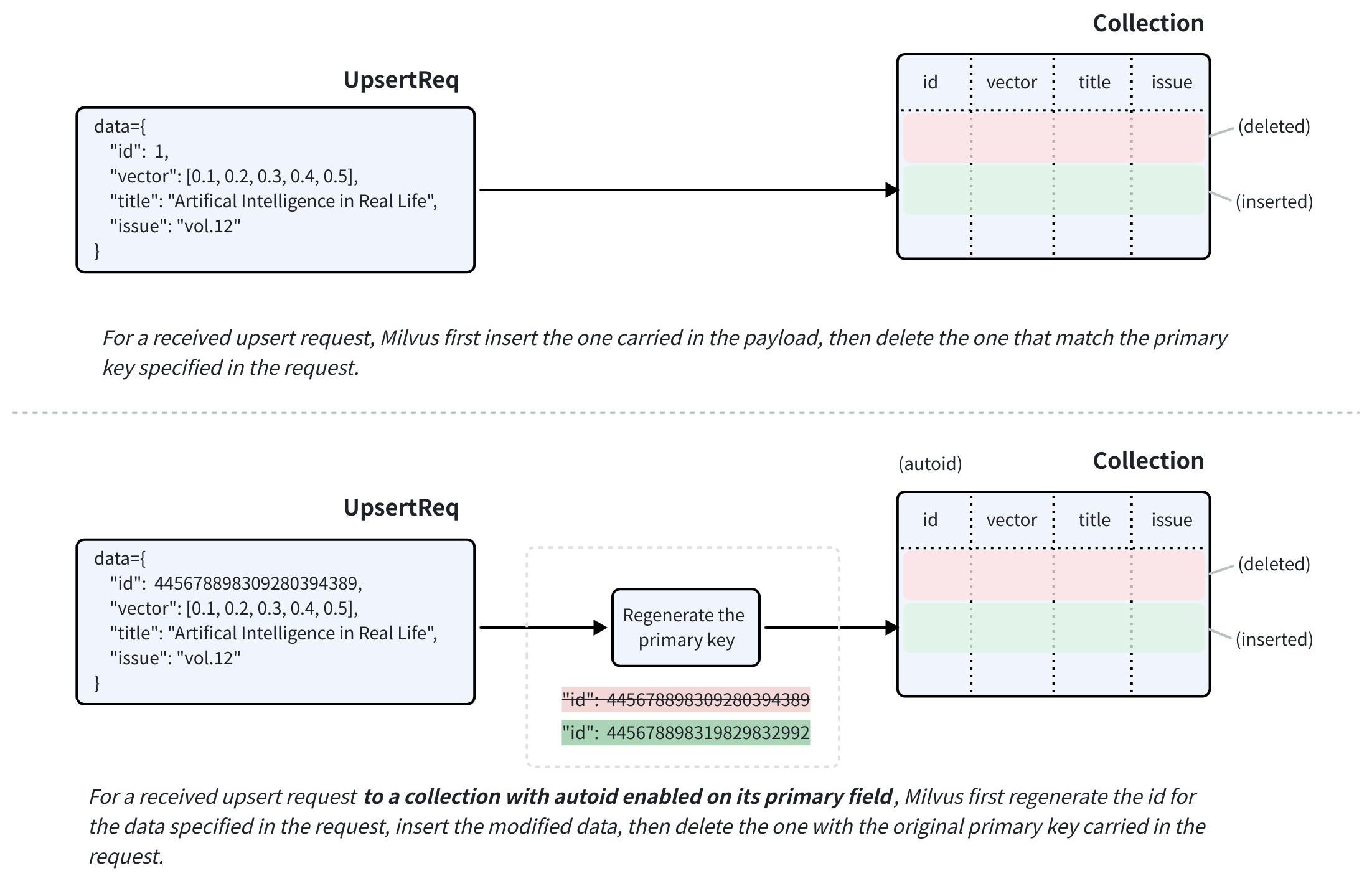 覆盖模式下的 upsert
如果目标 Collection 的主字段已启用autoID ,则upsert 请求仍必须包括目标实体的主键。Milvus 使用所提供的主键来定位要替换的实体,并在插入请求有效载荷中携带的数据前生成一个新的主键。
对于已启用nullable 的字段,如果不需要更新,可以在upsert 请求中省略。
在合并模式下向 upsertCompatible with Milvus v2.6.2+
您还可以使用partial_update 标志,使上载请求以合并模式运行。这样就可以在请求有效载荷中只包含需要更新的字段。
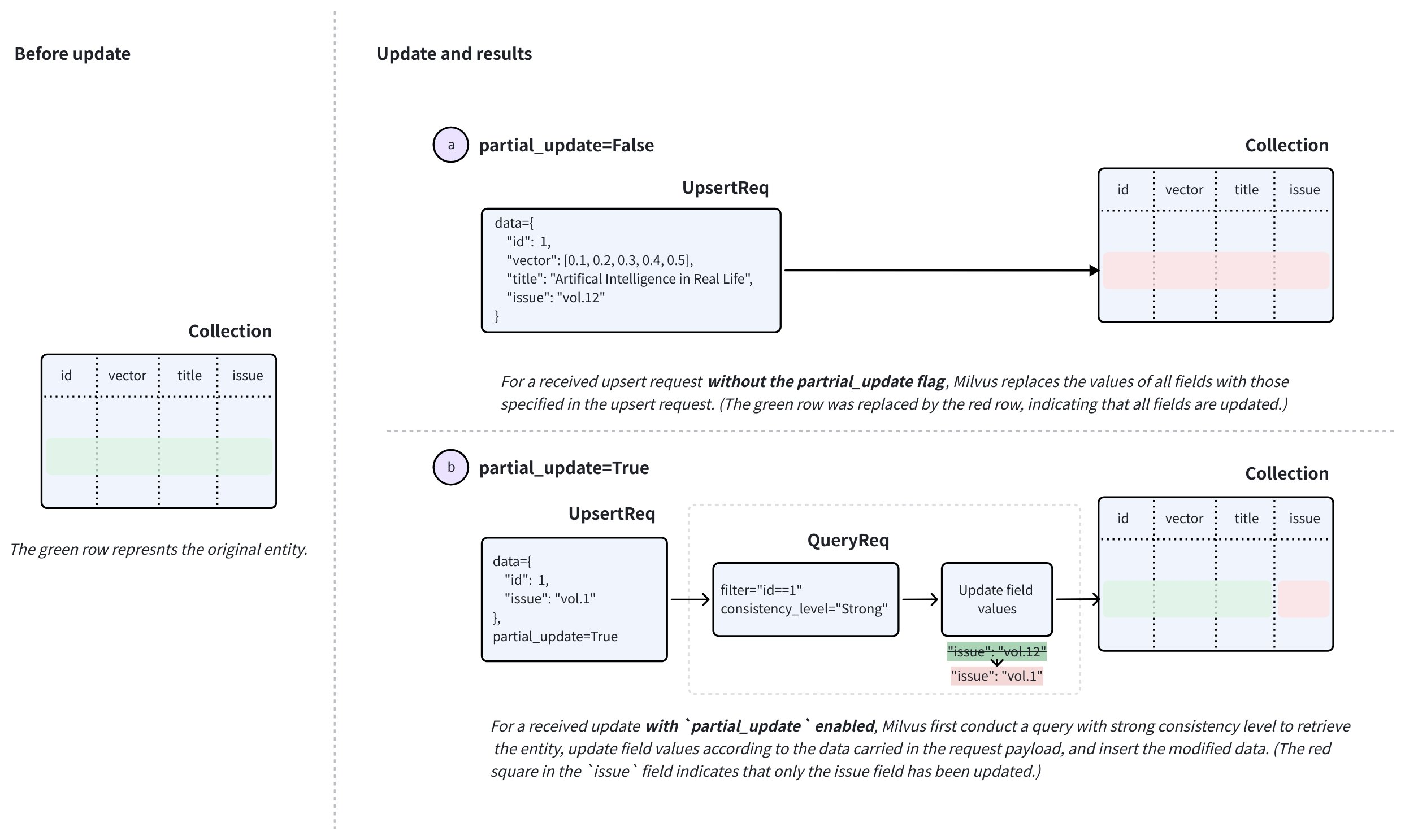 合并模式下的 upsert
要执行合并,请在upsert 请求中将partial_update 设置为True ,并将主键和需要更新的字段设置为新值。
收到这样的请求后,Milvus 会执行强一致性查询以检索实体,根据请求中的数据更新字段值,插入修改后的数据,然后用请求中携带的原始主键删除现有实体。
对于ARRAY 字段,合并模式支持两种操作符:ARRAY_APPEND 和ARRAY_REMOVE 。这些操作符可让您在现有ARRAY 字段中追加元素或删除匹配元素,而无需先查询实体以获取其当前值。有关详细信息,请参阅使用部分更新操作符的 Upsert ARRAY 字段。
Upsert 行为:特别注意事项
在使用合并功能之前,有几个特别注意事项需要考虑。以下情况假定您有一个 Collection,其中有两个标量字段,分别名为title 和issue ,以及一个主键id 和一个向量字段vector 。
-
启用
nullable的向 upsert 字段 。假设
issue字段可以为空。在倒插这些字段时,请注意以下几点:-
如果在
upsert请求中省略issue字段并禁用partial_update,issue字段将更新为null,而不是保留其原始值。 -
要保留
issue字段的原始值,要么启用partial_update并省略issue字段,要么在upsert请求中包含issue字段及其原始值。
-
-
在动态字段中倒插键。
假设在示例 Collection 中启用了动态键,实体动态字段中的键值对与
{"author": "John", "year": 2020, "tags": ["fiction"]}类似。当你向 upsert 实体的键,如
author,year, 或tags,或添加其他键时,请注意:-
如果上载
partial_update时禁用,默认行为是覆盖。这意味着动态字段的值将被请求中包含的所有非 Schema 定义的字段及其值覆盖。例如,如果请求中包含的数据是
{"author": "Jane", "genre": "fantasy"},目标实体动态字段中的键值对将更新为该值。 -
如果在启用
partial_update的情况下进行 upsert,默认行为是合并。这意味着动态字段的值将与请求中包含的所有非 Schema 定义的字段及其值合并。例如,如果请求中包含的数据是
{"author": "John", "year": 2020, "tags": ["fiction"]},则目标实体动态字段中的键值对在 upsert 后将变成{"author": "John", "year": 2020, "tags": ["fiction"], "genre": "fantasy"}。
-
-
倒插一个 JSON 字段。
假设示例 Collection 有一个名为
extras的 Schema 定义 JSON 字段,实体的此 JSON 字段中的键值对类似于{"author": "John", "year": 2020, "tags": ["fiction"]}。当您使用修改后的 JSON 数据向 upsert 实体的
extras字段时,请注意该 JSON 字段被视为一个整体,您不能有选择地更新单个键。换句话说,JSON 字段不支持合并模式下的倒插。 -
倒插
ARRAY字段。在合并模式下,
ARRAY字段支持ARRAY_APPEND和ARRAY_REMOVE部分更新操作符。当您想在现有ARRAY字段中添加元素或移除匹配元素而不替换整个数组值时,请使用这些操作符。
限制和约束
根据上述内容,有几个限制和约束需要遵循:
-
upsert请求必须始终包含目标实体的主键,即使启用了autoID。对于autoIDCollection,请求中的主键标识了要替换的现有实体。Milvus 会为插入的替换实体生成新的主键。 -
目标 Collection 必须已加载并可供查询。
-
请求中指定的所有字段必须存在于目标 Collection 的 Schema 中。
-
请求中指定的所有字段的值必须与 Schema 中定义的数据类型相匹配。
-
对于使用函数从另一个字段派生出来的任何字段,Milvus 将在倒插过程中删除派生字段,以便重新计算。
倒插 Collection 中的实体
在本节中,我们将把实体上载到名为my_collection 的 Collection 中。该 Collection 只有两个字段,分别名为id,vector,title 和issue 。id 字段是主字段,而title 和issue 字段是标量字段。
这三个实体如果存在于 Collection 中,将被包含 upsert 请求的实体覆盖。
- Python
- Java
- NodeJS
- Go
- cURL
from pymilvus import MilvusClient

client = MilvusClient(
    uri="http://localhost:19530",
    token="root:Milvus"
)

data=[
    {
        "id": 0,
        "vector": [-0.619954382375778, 0.4479436794798608, -0.17493894838751745, -0.4248030059917294, -0.8648452746018911],
        "title": "Artificial Intelligence in Real Life",
        "issue": "vol.12"
    }, {
        "id": 1,
        "vector": [0.4762662251462588, -0.6942502138717026, -0.4490002642657902, -0.628696575798281, 0.9660395877041965],
        "title": "Hollow Man",
        "issue": "vol.19"
    }, {
        "id": 2,
        "vector": [-0.8864122635045097, 0.9260170474445351, 0.801326976181461, 0.6383943392381306, 0.7563037341572827],
        "title": "Treasure Hunt in Missouri",
        "issue": "vol.12"
    }
]

res = client.upsert(
    collection_name='my_collection',
    data=data
)

print(res)

# Output
# {'upsert_count': 3}
import com.google.gson.Gson;
import com.google.gson.JsonObject;
import io.milvus.v2.client.ConnectConfig;
import io.milvus.v2.client.MilvusClientV2;
import io.milvus.v2.service.vector.request.UpsertReq;
import io.milvus.v2.service.vector.response.UpsertResp;

import java.util.*;

MilvusClientV2 client = new MilvusClientV2(ConnectConfig.builder()
        .uri("http://localhost:19530")
        .token("root:Milvus")
        .build());

Gson gson = new Gson();
List<JsonObject> data = Arrays.asList(
        gson.fromJson("{\"id\": 0, \"vector\": [-0.619954382375778, 0.4479436794798608, -0.17493894838751745, -0.4248030059917294, -0.8648452746018911], \"title\": \"Artificial Intelligence in Real Life\", \"issue\": \"\vol.12\"}", JsonObject.class),
        gson.fromJson("{\"id\": 1, \"vector\": [0.4762662251462588, -0.6942502138717026, -0.4490002642657902, -0.628696575798281, 0.9660395877041965], \"title\": \"Hollow Man\", \"issue\": \"vol.19\"}", JsonObject.class),
        gson.fromJson("{\"id\": 2, \"vector\": [-0.8864122635045097, 0.9260170474445351, 0.801326976181461, 0.6383943392381306, 0.7563037341572827], \"title\": \"Treasure Hunt in Missouri\", \"issue\": \"vol.12\"}", JsonObject.class),
);

UpsertReq upsertReq = UpsertReq.builder()
        .collectionName("my_collection")
        .data(data)
        .build();

UpsertResp upsertResp = client.upsert(upsertReq);
System.out.println(upsertResp);

// Output:
//
// UpsertResp(upsertCnt=3)
const { MilvusClient, DataType } = require("@zilliz/milvus2-sdk-node")

const address = "http://localhost:19530";
const token = "root:Milvus";
const client = new MilvusClient({address, token});

data = [
    {id: 0, vector: [-0.619954382375778, 0.4479436794798608, -0.17493894838751745, -0.4248030059917294, -0.8648452746018911], title: "Artificial Intelligence in Real Life", issue: "vol.12"},
    {id: 1, vector: [0.4762662251462588, -0.6942502138717026, -0.4490002642657902, -0.628696575798281, 0.9660395877041965], title: "Hollow Man", issue: "vol.19"},
    {id: 2, vector: [-0.8864122635045097, 0.9260170474445351, 0.801326976181461, 0.6383943392381306, 0.7563037341572827], title: "Treasure Hunt in Missouri", issue: "vol.12"},
]

res = await client.upsert({
    collection_name: "my_collection",
    data: data,
})

console.log(res.upsert_cnt)

// Output
//
// 3
//
import (
    "context"
    "fmt"

    "github.com/milvus-io/milvus/client/v2/column"
    "github.com/milvus-io/milvus/client/v2/milvusclient"
)

ctx, cancel := context.WithCancel(context.Background())
defer cancel()

milvusAddr := "localhost:19530"
client, err := milvusclient.New(ctx, &milvusclient.ClientConfig{
    Address: milvusAddr,
})
if err != nil {
    fmt.Println(err.Error())
    // handle error
}
defer client.Close(ctx)

titleColumn := column.NewColumnString("title", []string{
    "Artificial Intelligence in Real Life", "Hollow Man", "Treasure Hunt in Missouri",
})

issueColumn := column.NewColumnString("issue", []string{
    "vol.12", "vol.19", "vol.12"
})

_, err = client.Upsert(ctx, milvusclient.NewColumnBasedInsertOption("my_collection").
    WithInt64Column("id", []int64{0, 1, 2, 3, 4, 5, 6, 7, 8, 9}).
    WithFloatVectorColumn("vector", 5, [][]float32{
        {0.3580376395471989, -0.6023495712049978, 0.18414012509913835, -0.26286205330961354, 0.9029438446296592},
        {0.19886812562848388, 0.06023560599112088, 0.6976963061752597, 0.2614474506242501, 0.838729485096104},
        {0.43742130801983836, -0.5597502546264526, 0.6457887650909682, 0.7894058910881185, 0.20785793220625592},
    }).
    WithColumns(titleColumn, issueColumn),
)
if err != nil {
    fmt.Println(err.Error())
    // handle err
}
export CLUSTER_ENDPOINT="http://localhost:19530"
export TOKEN="root:Milvus"

curl --request POST \
--url "${CLUSTER_ENDPOINT}/v2/vectordb/entities/upsert" \
--header "Authorization: Bearer ${TOKEN}" \
--header "Content-Type: application/json" \
--header "Request-Timeout: 10" \
-d '{
    "data": [
        {"id": 0, "vector": [0.3580376395471989, -0.6023495712049978, 0.18414012509913835, -0.26286205330961354, 0.9029438446296592], "title": "Artificial Intelligence in Real Life", "issue": "vol.12"},
        {"id": 1, "vector": [0.19886812562848388, 0.06023560599112088, 0.6976963061752597, 0.2614474506242501, 0.838729485096104], "title": "Hollow Man", "issue": "vol.19"},
        {"id": 2, "vector": [0.43742130801983836, -0.5597502546264526, 0.6457887650909682, 0.7894058910881185, 0.20785793220625592], "title": "Treasure Hunt in Missouri", "issue": "vol.12"},
],
    "collectionName": "my_collection"
}'

# {
#     "code": 0,
#     "data": {
#         "upsertCount": 3,
#         "upsertIds": [
#             0,
#             1,
#             2,
#         ]
#     }
# }
向 upsertPartition 中的实体
您还可以将实体上载到指定的 Partition 中。以下代码片段假定你的 Collection 中有一个名为PartitionA的 Partition。
如果 Partition 中存在三个实体,它们将被请求中包含的实体覆盖。
- Python
- Java
- NodeJS
- Go
- cURL
data=[
    {
        "id": 10,
        "vector": [0.06998888224297328, 0.8582816610326578, -0.9657938677934292, 0.6527905683627726, -0.8668460657158576],
        "title": "Layour Design Reference",
        "issue": "vol.34"
    },
    {
        "id": 11,
        "vector": [0.6060703043917468, -0.3765080534566074, -0.7710758854987239, 0.36993888322346136, 0.5507513364206531],
        "title": "Doraemon and His Friends",
        "issue": "vol.2"
    },
    {
        "id": 12,
        "vector": [-0.9041813104515337, -0.9610546012461163, 0.20033003106083358, 0.11842506351635174, 0.8327356724591011],
        "title": "Pikkachu and Pokemon",
        "issue": "vol.12"
    },
]

res = client.upsert(
    collection_name="my_collection",
    data=data,
    partition_name="partitionA"
)

print(res)

# Output
# {'upsert_count': 3}
import io.milvus.v2.service.vector.request.UpsertReq;
import io.milvus.v2.service.vector.response.UpsertResp;

Gson gson = new Gson();
List<JsonObject> data = Arrays.asList(
        gson.fromJson("{\"id\": 10, \"vector\": [0.06998888224297328, 0.8582816610326578, -0.9657938677934292, 0.6527905683627726, -0.8668460657158576], \"title\": \"Layour Design Reference\", \"issue\": \"vol.34\"}", JsonObject.class),
        gson.fromJson("{\"id\": 11, \"vector\": [0.6060703043917468, -0.3765080534566074, -0.7710758854987239, 0.36993888322346136, 0.5507513364206531], \"title\": \"Doraemon and His Friends\", \"issue\": \"vol.2\"}", JsonObject.class),
        gson.fromJson("{\"id\": 12, \"vector\": [-0.9041813104515337, -0.9610546012461163, 0.20033003106083358, 0.11842506351635174, 0.8327356724591011], \"title\": \"Pikkachu and Pokemon\", \"issue\": \"vol.12\"}", JsonObject.class),
);

UpsertReq upsertReq = UpsertReq.builder()
        .collectionName("my_collection")
        .partitionName("partitionA")
        .data(data)
        .build();

UpsertResp upsertResp = client.upsert(upsertReq);
System.out.println(upsertResp);

// Output:
//
// UpsertResp(upsertCnt=3)
const { MilvusClient, DataType } = require("@zilliz/milvus2-sdk-node")

// 6. Upsert data in partitions
data = [
    {id: 10, vector: [0.06998888224297328, 0.8582816610326578, -0.9657938677934292, 0.6527905683627726, -0.8668460657158576], title: "Layour Design Reference", issue: "vol.34"},
    {id: 11, vector: [0.6060703043917468, -0.3765080534566074, -0.7710758854987239, 0.36993888322346136, 0.5507513364206531], title: "Doraemon and His Friends", issue: "vol.2"},
    {id: 12, vector: [-0.9041813104515337, -0.9610546012461163, 0.20033003106083358, 0.11842506351635174, 0.8327356724591011], title: "Pikkachu and Pokemon", issue: "vol.12"},
]

res = await client.upsert({
    collection_name: "my_collection",
    data: data,
    partition_name: "partitionA"
})

console.log(res.upsert_cnt)

// Output
//
// 3
//
titleColumn = column.NewColumnString("title", []string{
    "Layour Design Reference", "Doraemon and His Friends", "Pikkachu and Pokemon",
})
issueColumn = column.NewColumnString("issue", []string{
    "vol.34", "vol.2", "vol.12",
})

_, err = client.Upsert(ctx, milvusclient.NewColumnBasedInsertOption("my_collection").
    WithPartition("partitionA").
    WithInt64Column("id", []int64{10, 11, 12, 13, 14, 15, 16, 17, 18, 19}).
    WithFloatVectorColumn("vector", 5, [][]float32{
        {0.3580376395471989, -0.6023495712049978, 0.18414012509913835, -0.26286205330961354, 0.9029438446296592},
        {0.19886812562848388, 0.06023560599112088, 0.6976963061752597, 0.2614474506242501, 0.838729485096104},
        {0.43742130801983836, -0.5597502546264526, 0.6457887650909682, 0.7894058910881185, 0.20785793220625592},
    }).
    WithColumns(titleColumn, issueColumn),
)
if err != nil {
    fmt.Println(err.Error())
    // handle err
}
export CLUSTER_ENDPOINT="http://localhost:19530"
export TOKEN="root:Milvus"

curl --request POST \
--url "${CLUSTER_ENDPOINT}/v2/vectordb/entities/upsert" \
--header "Authorization: Bearer ${TOKEN}" \
--header "Content-Type: application/json" \
--header "Request-Timeout: 10" \
-d '{
    "data": [
        {"id": 10, "vector": [0.06998888224297328, 0.8582816610326578, -0.9657938677934292, 0.6527905683627726, -0.8668460657158576], "title": "Layour Design Reference", "issue": "vol.34"},
        {"id": 11, "vector": [0.6060703043917468, -0.3765080534566074, -0.7710758854987239, 0.36993888322346136, 0.5507513364206531], "title": "Doraemon and His Friends", "issue": "vol.2"},
        {"id": 12, "vector": [-0.9041813104515337, -0.9610546012461163, 0.20033003106083358, 0.11842506351635174, 0.8327356724591011], "title": "Pikkachu and Pokemon", "issue": "vol.12"},
    ],
    "collectionName": "my_collection",
    "partitionName": "partitionA"
}'

# {
#     "code": 0,
#     "data": {
#         "upsertCount": 3,
#         "upsertIds": [
#             10,
#             11,
#             12,
#         ]
#     }
# }
在合并模式下倒插实体 Compatible with Milvus v2.6.2+
下面的代码示例演示了如何通过部分更新来倒插实体。只提供需要更新的字段及其新值,以及显式部分更新标记。
在下面的示例中,upsert 请求中指定的实体的issue 字段将更新为请求中包含的值。
在合并模式下执行 upsert 时,请确保请求中涉及的实体具有相同的字段集。假设有两个或更多实体要进行 upsert,如以下代码片段所示,它们必须包含相同的字段,以防止出现错误并保持数据完整性。
- Python
- Java
- Go
- NodeJS
- cURL
data=[
    {
        "id": 1,
        "issue": "vol.14"
    },
    {
        "id": 2,
        "issue": "vol.7"
    }
]

res = client.upsert(
    collection_name="my_collection",
    data=data,
    partial_update=True
)

print(res)

# Output
# {'upsert_count': 2}
JsonObject row1 = new JsonObject();
row1.addProperty("id", 1);
row1.addProperty("issue", "vol.14");

JsonObject row2 = new JsonObject();
row2.addProperty("id", 2);
row2.addProperty("issue", "vol.7");

UpsertReq upsertReq = UpsertReq.builder()
        .collectionName("my_collection")
        .data(Arrays.asList(row1, row2))
        .partialUpdate(true)
        .build();

UpsertResp upsertResp = client.upsert(upsertReq);
System.out.println(upsertResp);

// Output:
//
// UpsertResp(upsertCnt=2)
pkColumn := column.NewColumnInt64("id", []int64{1, 2})
issueColumn = column.NewColumnString("issue", []string{
    "vol.17", "vol.7",
})

_, err = client.Upsert(ctx, milvusclient.NewColumnBasedInsertOption("my_collection").
    WithColumns(pkColumn, issueColumn).
    WithPartialUpdate(true),
)
if err != nil {
    fmt.Println(err.Error())
    // handle err
}
const data=[
    {
        "id": 1,
        "issue": "vol.14"
    },
    {
        "id": 2,
        "issue": "vol.7"
    }
];

const res = await client.upsert({
    collection_name: "my_collection",
    data,
    partial_update: true
});

console.log(res)

// Output
//
// 2
//
export CLUSTER_ENDPOINT="http://localhost:19530"
export TOKEN="root:Milvus"

export COLLECTION_NAME="my_collection"
export UPSERT_DATA='[
  {
    "id": 1,
    "issue": "vol.14"
  },
  {
    "id": 2,
    "issue": "vol.7"
  }
]'

curl -X POST "http://localhost:19530/v2/vectordb/entities/upsert" \
  -H "Content-Type: application/json" \
  -H "Request-Timeout: 10" \
  -H "Authorization: Bearer ${TOKEN}" \
  -d "{
    \"collectionName\": \"${COLLECTION_NAME}\",
    \"data\": ${UPSERT_DATA},
    \"partialUpdate\": true
  }"

# {
#     "code": 0,
#     "data": {
#         "upsertCount": 2,
#         "upsertIds": [
#              3,
#             12,
#         ]
#     }
# }
使用部分更新操作符倒插 ARRAY 字段 Compatible with Milvus v2.6.17+
在引入部分更新操作符之前,更新ARRAY 字段的部分内容需要客户端读取-修改-写入流程:查询现有数组,在应用代码中进行修改,然后向 upsert 完整的替换值。部分更新操作符可以让你只发送要追加或移除的元素,从而减少了客户端逻辑,避免了上载前的额外读取。
假设主键为1 的实体已经有tags = ["new", "trial"] 。如果没有部分更新操作符,向数组中添加"premium" 就需要向 upsert 完整的替换数组:
- Python
- Java
- NodeJS
- Go
- cURL
client.upsert(
    collection_name="users",
    data=[{"pk": 1, "tags": ["new", "trial", "premium"]}],
    partial_update=True,
)
List<JsonObject> replacementData = Collections.singletonList(
        gson.fromJson("{\"pk\": 1, \"tags\": [\"new\", \"trial\", \"premium\"]}", JsonObject.class)
);

client.upsert(UpsertReq.builder()
        .collectionName("users")
        .partialUpdate(true)
        .data(replacementData)
        .build());
// nodejs
// go
# restful
使用ARRAY_APPEND 时,只需发送要添加的元素:
- Python
- Java
- NodeJS
- Go
- cURL
from pymilvus import FieldOp

client.upsert(
    collection_name="users",
    data=[{"pk": 1, "tags": ["premium"]}],
    field_ops={"tags": FieldOp.array_append()},
)
List<JsonObject> appendData = Collections.singletonList(
        gson.fromJson("{\"pk\": 1, \"tags\": [\"premium\"]}", JsonObject.class)
);

UpsertReq.FieldPartialUpdateOp appendTags = UpsertReq.FieldPartialUpdateOp.builder()
        .fieldName("tags")
        .opType(UpsertReq.FieldPartialUpdateOp.OpType.ARRAY_APPEND)
        .build();

client.upsert(UpsertReq.builder()
        .collectionName("users")
        .data(appendData)
        .fieldOps(Collections.singletonList(appendTags))
        .build());
// nodejs
// go
# restful
通过field_ops 将任一操作符附加到字段,都会隐式启用部分更新语义。因此,您无需在传递partial_update=True 的同时传递field_ops 。
限制
- 有效负载值必须与
ARRAY目标字段的element_type匹配。例如,如果目标字段是ARRAY<VARCHAR>,则有效载荷必须包含字符串值。 ARRAY_APPEND和ARRAY_REMOVE支持ARRAY字段,其element_type为BOOL,INT8,INT16,INT32,INT64,FLOAT,DOUBLE, 或VARCHAR。- 进行
ARRAY_APPEND操作后,生成的数组长度不得超过字段的max_capacity。 - 对同一实体的并发上载在不同请求之间不是原子的。如果两个请求同时更新同一个
ARRAY字段,后一个写入会覆盖前一个写入。如果需要保留所有并发更改,请使用应用程序级协调。
示例
下面的示例使用了一个小型users Collection,其中有一个主键pk 、一个tags 类型的字段ARRAY<VARCHAR> 和一个embedding 向量字段。它首先插入两个具有初始tags 值的实体,然后使用ARRAY_APPEND 和ARRAY_REMOVE 来展示每个操作符如何更改存储的数组。
- Python
- Java
- NodeJS
- Go
- cURL
from pymilvus import DataType, FieldOp, MilvusClient

client = MilvusClient(
    uri="http://localhost:19530",
    token="root:Milvus"
)

# 1. Create a collection with an ARRAY<VARCHAR> field
schema = client.create_schema(enable_dynamic_field=False)
schema.add_field("pk", DataType.INT64, is_primary=True)
schema.add_field("embedding", DataType.FLOAT_VECTOR, dim=5)
schema.add_field(
    "tags",
    DataType.ARRAY,
    element_type=DataType.VARCHAR,
    max_capacity=8,
    max_length=32,
)

index_params = client.prepare_index_params()
index_params.add_index(
    field_name="embedding",
    index_type="AUTOINDEX",
    metric_type="L2",
)

client.create_collection(
    collection_name="users",
    schema=schema,
    index_params=index_params
)

# 2. Seed two entities
client.insert(
    collection_name="users",
    data=[
        {"pk": 1, "embedding": [0.1, 0.2, 0.3, 0.4, 0.5], "tags": ["new"]},
        {"pk": 2, "embedding": [0.6, 0.7, 0.8, 0.9, 1.0], "tags": ["new", "trial"]},
    ],
)

# 3. Append tags without reading the existing ARRAY values
client.upsert(
    collection_name="users",
    data=[
        {"pk": 1, "tags": ["premium", "vip"]},
        {"pk": 2, "tags": ["premium"]},
    ],
    field_ops={"tags": FieldOp.array_append()},
)

res = client.query(
    collection_name="users",
    filter="pk in [1, 2]",
    output_fields=["pk", "tags"],
)
print(res)

# Example output:
# data: [
#   "{'pk': 1, 'tags': ['new', 'premium', 'vip']}",
#   "{'pk': 2, 'tags': ['new', 'trial', 'premium']}"
# ]

# 4. Remove matching tags without replacing the full ARRAY field
client.upsert(
    collection_name="users",
    data=[
        {"pk": 1, "tags": ["new"]},
        {"pk": 2, "tags": ["trial"]},
    ],
    field_ops={"tags": FieldOp.array_remove()},
)

res = client.query(
    collection_name="users",
    filter="pk in [1, 2]",
    output_fields=["pk", "tags"],
)
print(res)

# Example output:
# data: [
#   "{'pk': 1, 'tags': ['premium', 'vip']}",
#   "{'pk': 2, 'tags': ['new', 'premium']}"
# ]
import com.google.gson.Gson;
import com.google.gson.JsonObject;
import io.milvus.v2.client.ConnectConfig;
import io.milvus.v2.client.MilvusClientV2;
import io.milvus.v2.common.ConsistencyLevel;
import io.milvus.v2.common.DataType;
import io.milvus.v2.common.IndexParam;
import io.milvus.v2.service.collection.request.AddFieldReq;
import io.milvus.v2.service.collection.request.CreateCollectionReq;
import io.milvus.v2.service.vector.request.InsertReq;
import io.milvus.v2.service.vector.request.QueryReq;
import io.milvus.v2.service.vector.request.UpsertReq;
import io.milvus.v2.service.vector.response.QueryResp;

import java.util.Arrays;
import java.util.Collections;
import java.util.List;

MilvusClientV2 client = new MilvusClientV2(ConnectConfig.builder()
        .uri("http://localhost:19530")
        .token("root:Milvus")
        .build());
Gson gson = new Gson();

// 1. Create a collection with an ARRAY<VARCHAR> field
CreateCollectionReq.CollectionSchema schema = CreateCollectionReq.CollectionSchema.builder()
        .enableDynamicField(false)
        .build();

schema.addField(AddFieldReq.builder()
        .fieldName("pk")
        .dataType(DataType.Int64)
        .isPrimaryKey(true)
        .build());
schema.addField(AddFieldReq.builder()
        .fieldName("embedding")
        .dataType(DataType.FloatVector)
        .dimension(5)
        .build());
schema.addField(AddFieldReq.builder()
        .fieldName("tags")
        .dataType(DataType.Array)
        .elementType(DataType.VarChar)
        .maxCapacity(8)
        .maxLength(32)
        .build());

List<IndexParam> indexParams = Collections.singletonList(IndexParam.builder()
        .fieldName("embedding")
        .indexType(IndexParam.IndexType.AUTOINDEX)
        .metricType(IndexParam.MetricType.L2)
        .build());

client.createCollection(CreateCollectionReq.builder()
        .collectionName("users")
        .collectionSchema(schema)
        .indexParams(indexParams)
        .consistencyLevel(ConsistencyLevel.STRONG)
        .build());

// 2. Seed two entities
List<JsonObject> data = Arrays.asList(
        gson.fromJson("{\"pk\": 1, \"embedding\": [0.1, 0.2, 0.3, 0.4, 0.5], \"tags\": [\"new\"]}", JsonObject.class),
        gson.fromJson("{\"pk\": 2, \"embedding\": [0.6, 0.7, 0.8, 0.9, 1.0], \"tags\": [\"new\", \"trial\"]}", JsonObject.class)
);

client.insert(InsertReq.builder()
        .collectionName("users")
        .data(data)
        .build());

// 3. Append tags without reading the existing ARRAY values
List<JsonObject> appendData = Arrays.asList(
        gson.fromJson("{\"pk\": 1, \"tags\": [\"premium\", \"vip\"]}", JsonObject.class),
        gson.fromJson("{\"pk\": 2, \"tags\": [\"premium\"]}", JsonObject.class)
);

UpsertReq.FieldPartialUpdateOp appendTags = UpsertReq.FieldPartialUpdateOp.builder()
        .fieldName("tags")
        .opType(UpsertReq.FieldPartialUpdateOp.OpType.ARRAY_APPEND)
        .build();

client.upsert(UpsertReq.builder()
        .collectionName("users")
        .data(appendData)
        .fieldOps(Collections.singletonList(appendTags))
        .build());

QueryResp res = client.query(QueryReq.builder()
        .collectionName("users")
        .filter("pk in [1, 2]")
        .outputFields(Arrays.asList("pk", "tags"))
        .consistencyLevel(ConsistencyLevel.STRONG)
        .build());
System.out.println(res);

// Example output:
// [
//   {"pk": 1, "tags": ["new", "premium", "vip"]},
//   {"pk": 2, "tags": ["new", "trial", "premium"]}
// ]

// 4. Remove matching tags without replacing the full ARRAY field
List<JsonObject> removeData = Arrays.asList(
        gson.fromJson("{\"pk\": 1, \"tags\": [\"new\"]}", JsonObject.class),
        gson.fromJson("{\"pk\": 2, \"tags\": [\"trial\"]}", JsonObject.class)
);

UpsertReq.FieldPartialUpdateOp removeTags = UpsertReq.FieldPartialUpdateOp.builder()
        .fieldName("tags")
        .opType(UpsertReq.FieldPartialUpdateOp.OpType.ARRAY_REMOVE)
        .build();

client.upsert(UpsertReq.builder()
        .collectionName("users")
        .data(removeData)
        .fieldOps(Collections.singletonList(removeTags))
        .build());

res = client.query(QueryReq.builder()
        .collectionName("users")
        .filter("pk in [1, 2]")
        .outputFields(Arrays.asList("pk", "tags"))
        .consistencyLevel(ConsistencyLevel.STRONG)
        .build());
System.out.println(res);

// Example output:
// [
//   {"pk": 1, "tags": ["premium", "vip"]},
//   {"pk": 2, "tags": ["new", "premium"]}
// ]
// nodejs
// go
# restful