Hugging Face Ranker
向量搜索会按向量距离对结果排序,但初始顺序可能无法反映每个候选文本回答查询的相关程度。Hugging Face Ranker 会将查询和候选文本发送到托管的 Hugging Face Inference Providers,并使用 sentence-similarity 分数对 Milvus 返回的候选结果 Reranking。
此集成使用托管的 Hugging Face router。要使用单独部署的 Text Embedding Inference (TEI) 服务进行 rerank,请参阅 TEI Ranker。
Limits
- Function 必须在
input_field_names中引用且仅引用一个非 nullable 的VARCHAR字段。 queries中的字符串数量必须等于搜索查询数量(nq)。
工作原理
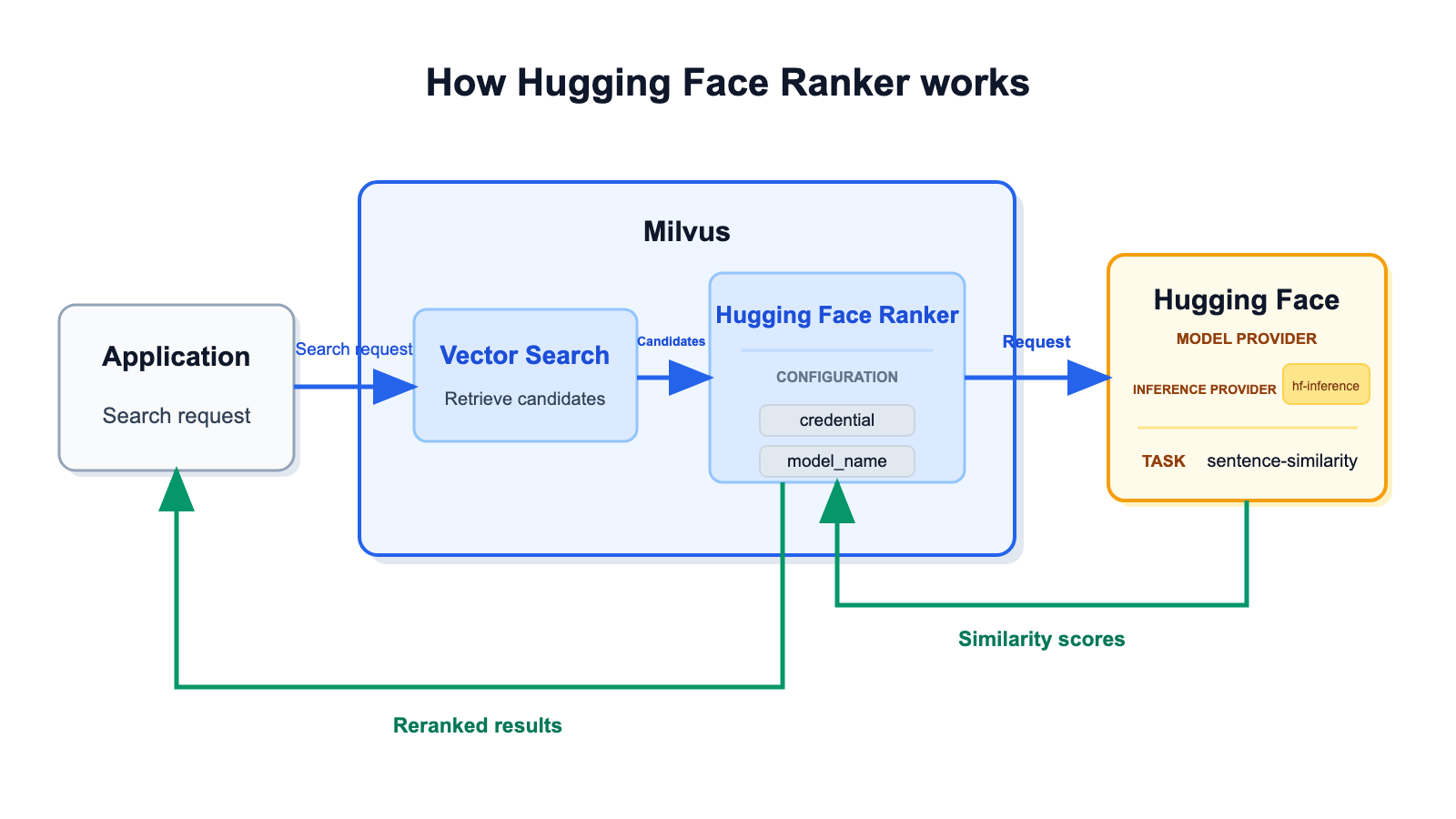
Hugging Face Ranker 在初始向量搜索之后运行:
- 检索候选 Entity。 Milvus 搜索配置的向量字段并收集候选 Entity。
- 准备用于 reranking 的文本。 Function 从
params.queries读取查询文本,并从input_field_names指定的VARCHAR字段读取候选文本。 - 请求相似度分数。 Milvus 通过
hf-inference将查询作为source_sentence、候选文本作为sentences发送到 Hugging Facesentence-similarityPipeline。 - 对候选结果 rerank。 Hugging Face 为每个候选结果返回一个分数。Milvus 按分数从高到低对候选结果排序,并返回 rerank 后的结果。
相似度分数的计算方式
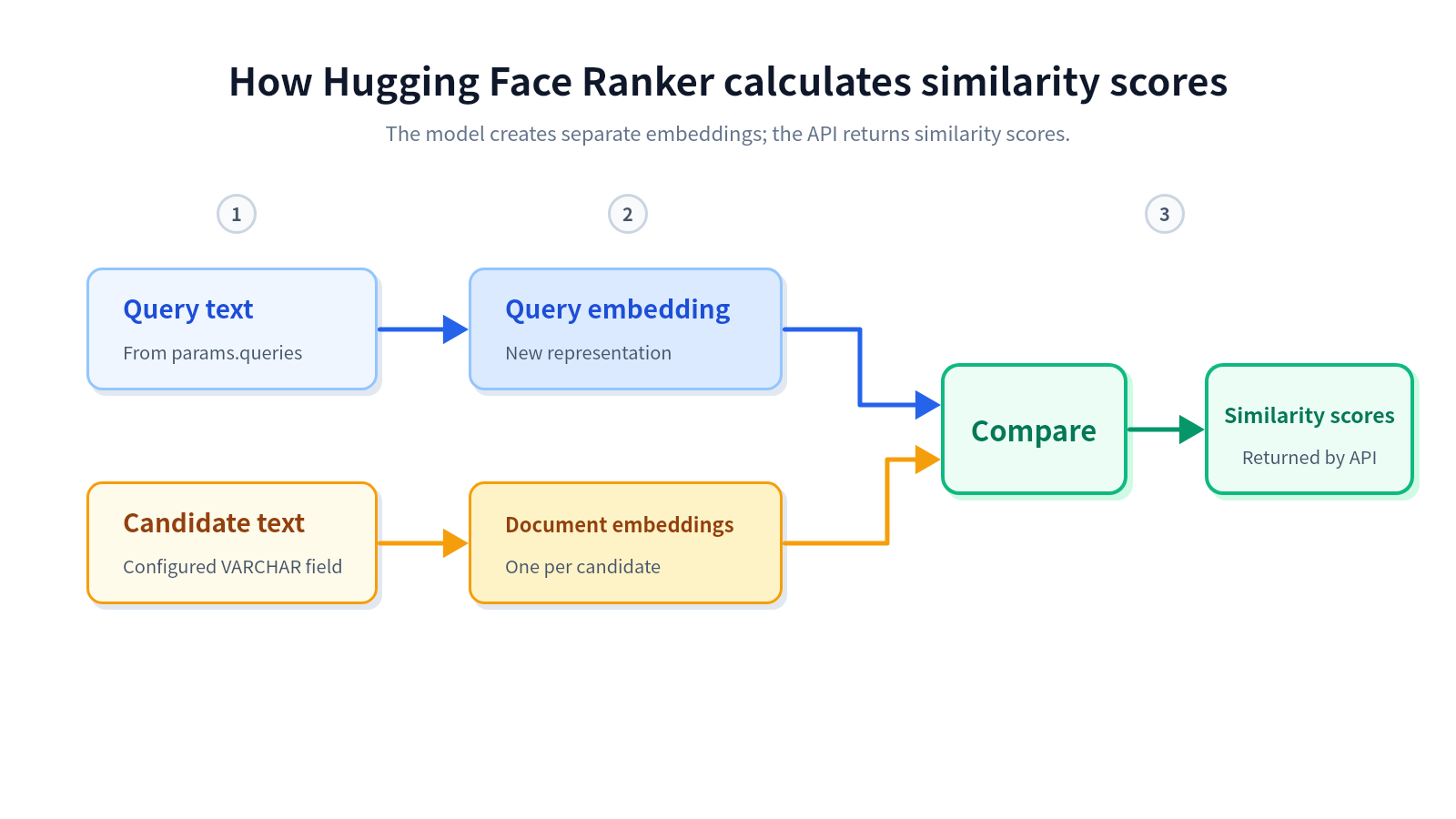
Hugging Face 模型分三个阶段计算分数:
- 准备文本输入。 Ranker 从
params.queries读取查询文本,并从配置的VARCHAR字段读取候选文本。 - 创建独立的模型表征。 Milvus 将查询作为
source_sentence、候选文本作为sentences发送。模型会在内部分别编码查询和每个候选文本。 - 比较并返回分数。 模型将查询表征与每个候选文本表征进行比较,并为每个候选结果返回一个相似度分数。
Hugging Face 模型使用的 Embedding 或表征属于模型内部的中间处理结果。Hugging Face 返回的是分数,而不是向量。因此,初始向量检索和模型 reranking 使用的是不同表征,也可以使用不同模型。
Before you start
在使用 Hugging Face Ranker 前,请确保你具备:
- Milvus 2.6.20 或 2.6 release line 中的更高版本。
- PyMilvus 2.6.16 或更高版本。
- 可调用 Inference Providers 的 Hugging Face User Access Token。
- 当前由
hf-inference提供服务、用于sentence-similaritytask 的模型。 - 一个在非空
VARCHAR字段中存储候选文本的 collection。
Milvus 无法控制 Hugging Face 模型是否持续通过 hf-inference 可用,也无法保证该模型满足你的稳定性、延迟和输出质量要求。在生产环境中使用前,请先在 Hugging Face 上验证模型,并针对你的 workload 进行评估。
示例仅使用 sentence-transformers/all-MiniLM-L6-v2 演示配置方式。该模型并不代表 Milvus 的推荐或认证。
配置凭据
你可以在 milvus.yaml 中配置 Hugging Face User Access Token,也可以通过环境变量配置。
凭据优先级如下:
Function credential label -> provider credential label in milvus.yaml -> environment variable
Option 1: Configuration file
在顶层 credential 配置段下定义 token,然后将 Hugging Face ranker provider 指向对应的 credential label:
# milvus.yaml
credential:
  huggingface_apikey:
    apikey: <YOUR_HUGGING_FACE_TOKEN>

function:
  rerank:
    model:
      providers:
        huggingface:
          credential: huggingface_apikey
          # url: https://router.huggingface.co
Function-level credential 参数可以覆盖 provider-level label。其值必须是 milvus.yaml 中定义的 credential label,而不是 token 本身。
Option 2:环境变量
如果 Function 和 provider configuration 都没有指定 credential label,请在 Milvus 服务环境中设置 MILVUS_HUGGINGFACE_API_KEY:
# docker-compose.yaml
standalone:
  environment:
    MILVUS_HUGGINGFACE_API_KEY: <YOUR_HUGGING_FACE_TOKEN>
Use Hugging Face Ranker
Hugging Face Ranker 在搜索时定义并应用。你可以为每次搜索更改或省略 ranker,而无需修改 collection schema。
Step 1: Prepare a collection
以下示例创建一个 Collection,其中包含用于 reranking 的文本字段和用于初始检索的 vector 字段:
from pymilvus import DataType, Function, FunctionType, MilvusClient

client = MilvusClient(uri="http://localhost:19530")

collection_name = "hugging_face_rerank_demo"
schema = client.create_schema()
schema.add_field("id", DataType.INT64, is_primary=True, auto_id=False)
schema.add_field("document", DataType.VARCHAR, max_length=1000)
schema.add_field("dense", DataType.FLOAT_VECTOR, dim=4)

index_params = client.prepare_index_params()
index_params.add_index(
    field_name="dense",
    index_type="AUTOINDEX",
    metric_type="COSINE",
)

client.create_collection(
    collection_name=collection_name,
    schema=schema,
    index_params=index_params,
)

client.insert(
    collection_name=collection_name,
    data=[
        {
            "id": 1,
            "document": "Recent renewable energy developments include improved solar efficiency.",
            "dense": [0.10, 0.20, 0.30, 0.40],
        },
        {
            "id": 2,
            "document": "Climate policy and carbon markets have evolved rapidly in recent years.",
            "dense": [0.11, 0.19, 0.28, 0.39],
        },
        {
            "id": 3,
            "document": "New battery technology helps stabilize wind and solar power generation.",
            "dense": [0.90, 0.10, 0.05, 0.02],
        },
        {
            "id": 4,
            "document": "Vector databases support similarity search for machine learning applications.",
            "dense": [0.01, 0.02, 0.03, 0.04],
        },
    ],
)
Step 2: Define the rerank Function
定义一个 RERANK Function,从 document 读取候选文本,并使用 queries 中的查询文本:
hugging_face_ranker = Function(
    name="hugging_face_semantic_ranker",
    input_field_names=["document"],
    function_type=FunctionType.RERANK,
    params={
        "reranker": "model",
        "provider": "huggingface",
        "model_name": "sentence-transformers/all-MiniLM-L6-v2",
        "hf_provider": "hf-inference",
        "queries": ["renewable energy developments"],
        "credential": "huggingface_apikey",
        "max_client_batch_size": 32,
    },
)
如果你只使用 provider 级 credential 或环境变量,请从 Function 参数中省略 credential。
下表说明 Hugging Face Ranker 参数:
| 参数 | 是否必需 | 说明 |
|---|---|---|
reranker | 是 | reranking 实现。将该值设置为 model。 |
provider | 是 | 模型 provider。将该值设置为 huggingface。 |
model_name | 是 | 通过 hf-inference 为 sentence-similarity 任务提供服务的模型对应的 Hugging Face model ID。 |
queries | 是 | 用于 reranking 的查询字符串。即使初始检索使用 query vector,也需要为每个 search query 提供且仅提供一个字符串。 |
hf_provider | 否 | Hugging Face Inference Provider 路由。Milvus 2.6.20 中的默认值且唯一支持值为 hf-inference。 |
credential | 否 | 在 milvus.yaml 顶层 credential 区段中定义的 credential 标签。该值不是 token 本身。 |
max_client_batch_size | 否 | 单次 Hugging Face 请求中发送的候选文本最大数量。默认值为 32,且该值必须大于 0。 |
Step 3: 使用 ranker 执行 Search
通过 search() 的 ranker 参数传入 Function:
query_vector = [0.12, 0.21, 0.29, 0.41]

results = client.search(
    collection_name=collection_name,
    data=[query_vector],
    anns_field="dense",
    limit=3,
    output_fields=["document"],
    ranker=hugging_face_ranker,
    consistency_level="Strong",
)

print(results)
Milvus 会先从 dense 中检索候选结果,然后使用 queries 中的查询文本和 document 中的候选文本计算句子相似度分数。返回的候选结果会按 Hugging Face 分数排序。
Troubleshooting
模型不支持 sentence-similarity
打开 Hugging Face 上的模型页面,并查看 Inference Providers 部分。确认 hf-inference 是否为该模型提供 sentence-similarity 服务。如果没有,请选择另一个支持该任务的模型。
query strings 数量与 search request 不匹配
queries 中的字符串数量必须等于 search queries 数量(nq)。对于只有一个 query vector 的 search,请只提供一个 query string。
Candidate text 缺失或可为 NULL
确保 input_field_names 中有且仅有一个不可为 NULL 的 VARCHAR 字段,并且每个候选 Entity 都在该字段中包含文本。
Milvus reports missing Hugging Face credentials
确认 milvus.yaml 中存在 Function credential label,provider-level label 有效,或者 Milvus 服务环境中存在 MILVUS_HUGGINGFACE_API_KEY。
下一步
- 如需了解共享的 model-ranker 行为和限制,请参阅 Model Ranker Overview。
- 如需通过托管的 Hugging Face Inference Providers 生成 Embedding,请参阅 Hugging Face。
- 如需将 ranker 应用于 Hybrid Search,请参阅 Multi-Vector Hybrid Search。