

使用 Milvus 进行全文搜索
全文搜索是一种通过匹配文本中特定关键词或短语来检索文档的传统方法。它根据术语频率等因素计算出的相关性分数对结果进行排序。语义搜索更善于理解含义和上下文,而全文搜索则擅长精确的关键词匹配,因此是语义搜索的有益补充。构建检索增强生成(RAG)管道的常见方法包括通过语义搜索和全文搜索检索文档,然后通过 Reranker 流程来完善结果。
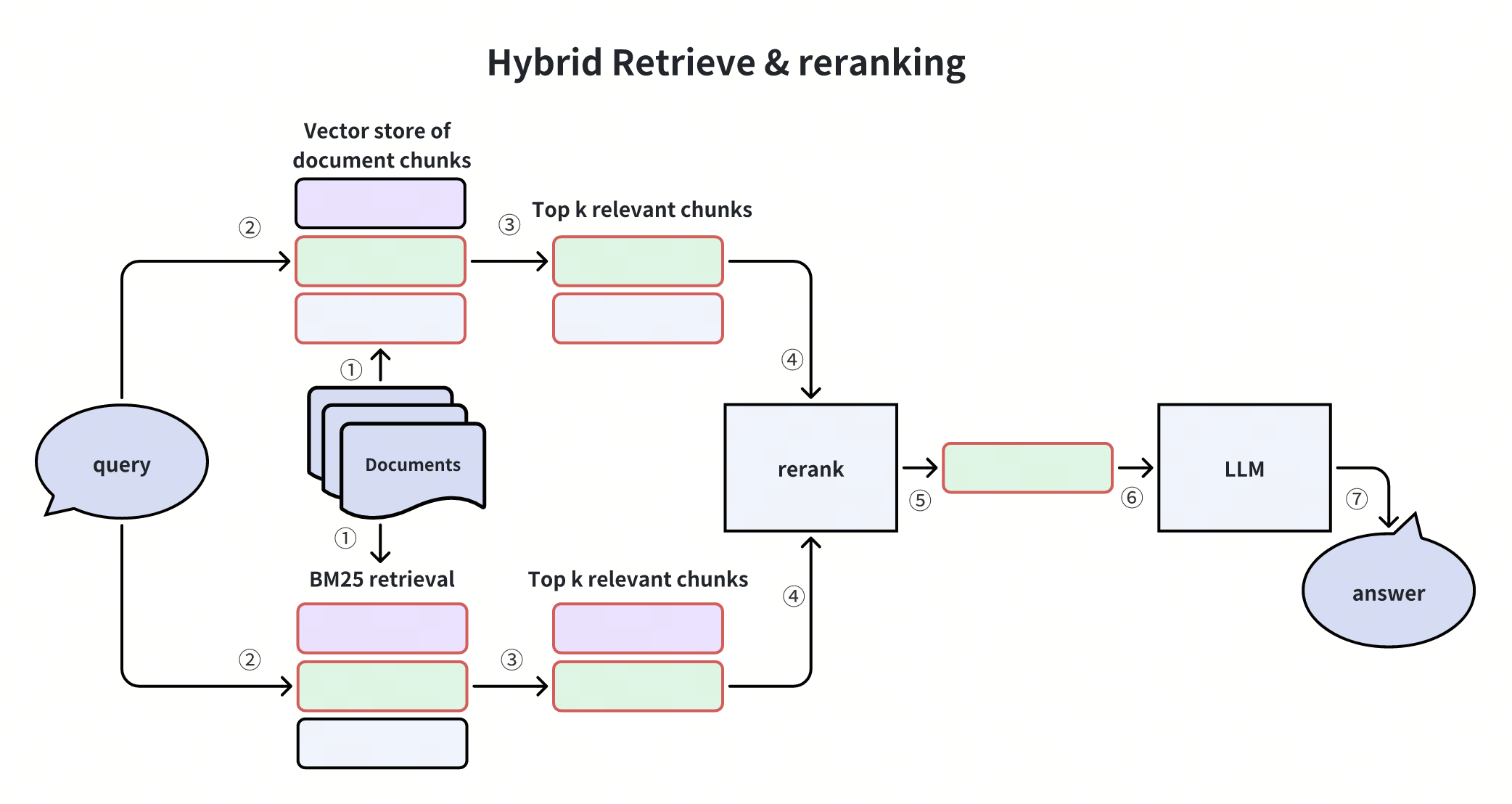
这种方法将文本转换成稀疏向量,用于 BM25 评分。要摄取文档,用户只需输入原始文本即可,无需手动计算稀疏向量。Milvus 会自动生成并存储稀疏向量。要搜索文档,用户只需指定文本搜索查询。Milvus 将在内部计算 BM25 分数,并返回排序结果。
Milvus 还支持混合检索,将全文搜索与基于稠密向量的语义检索相结合。通过平衡关键词匹配和语义理解,它通常能提高搜索质量,为用户提供更好的搜索结果。
- 目前,Milvus Standalone、Milvus Distributed 和 Zilliz Cloud 都提供全文搜索功能,不过 Milvus Lite 还不支持该功能(该功能计划在未来实现)。如需了解更多信息,请访问 support@zilliz.com。
准备工作
安装 PyMilvus
$ pip install pymilvus -U
如果您使用的是 Google Colab,要启用刚安装的依赖项,可能需要重启运行时(点击屏幕顶部的 "Runtime "菜单,从下拉菜单中选择 "Restart session")。
设置 OpenAI API 密钥
我们将使用 OpenAI 的模型创建向量 Embedding 并生成响应。您应将api 密钥 OPENAI_API_KEY 设置为环境变量。
import os

os.environ["OPENAI_API_KEY"] = "sk-***********"
设置和配置
导入必要的库
from typing import List
from openai import OpenAI

from pymilvus import (
    MilvusClient,
    DataType,
    Function,
    FunctionType,
    AnnSearchRequest,
    RRFRanker,
)
我们将使用 MilvusClient 与 Milvus 服务器建立连接。
# Connect to Milvus
uri = "http://localhost:19530"
collection_name = "full_text_demo"
client = MilvusClient(uri=uri)
对于 connection_args:
- 你可以在docker 或 kubernetes 上设置性能更强的 Milvus 服务器。在此设置中,请使用服务器地址,例如
http://localhost:19530,作为您的uri。 - 如果你想使用Zilliz Cloud(Milvus 的全托管云服务),请调整
uri和token,它们与 Zilliz Cloud 中的公共端点和 Api 密钥相对应。
为全文搜索设置 Collection
为全文搜索设置 Collection 需要几个配置步骤。让我们逐一说明。
文本分析配置
对于全文搜索,我们需要定义如何处理文本。分析器在全文搜索中至关重要,它可以将句子分解为词块,并执行词干和停顿词删除等词法分析。在这里,我们只需定义一个分析器。
# Define tokenizer parameters for text analysis
analyzer_params = {"tokenizer": "standard", "filter": ["lowercase"]}
有关分析器概念的详细信息,请参阅分析器文档。
Collection Schema 和 BM25 功能
现在我们定义 Schema,其中包含主键、文本内容、稀疏向量(用于全文搜索)、稠密向量(用于语义搜索)和元数据字段。我们还为全文搜索配置了 BM25 函数。
BM25 功能可自动将文本内容转换为稀疏向量,从而使 Milvus 能够处理复杂的全文搜索,而无需手动生成稀疏嵌入。
# Create schema
schema = MilvusClient.create_schema()
schema.add_field(
    field_name="id",
    datatype=DataType.VARCHAR,
    is_primary=True,
    auto_id=True,
    max_length=100,
)
schema.add_field(
    field_name="content",
    datatype=DataType.VARCHAR,
    max_length=65535,
    analyzer_params=analyzer_params,
    enable_match=True,  # Enable text matching
    enable_analyzer=True,  # Enable text analysis
)
schema.add_field(field_name="sparse_vector", datatype=DataType.SPARSE_FLOAT_VECTOR)
schema.add_field(
    field_name="dense_vector",
    datatype=DataType.FLOAT_VECTOR,
    dim=1536,  # Dimension for text-embedding-3-small
)
schema.add_field(field_name="metadata", datatype=DataType.JSON)

# Define BM25 function to generate sparse vectors from text
bm25_function = Function(
    name="bm25",
    function_type=FunctionType.BM25,
    input_field_names=["content"],
    output_field_names="sparse_vector",
)

# Add the function to schema
schema.add_function(bm25_function)
{'auto_id': False, 'description': '', 'fields': [{'name': 'id', 'description': '', 'type': <DataType.VARCHAR: 21>, 'params': {'max_length': 100}, 'is_primary': True, 'auto_id': True}, {'name': 'content', 'description': '', 'type': <DataType.VARCHAR: 21>, 'params': {'max_length': 65535, 'enable_match': True, 'enable_analyzer': True, 'analyzer_params': {'tokenizer': 'standard', 'filter': ['lowercase']}}}, {'name': 'sparse_vector', 'description': '', 'type': <DataType.SPARSE_FLOAT_VECTOR: 104>, 'is_function_output': True}, {'name': 'dense_vector', 'description': '', 'type': <DataType.FLOAT_VECTOR: 101>, 'params': {'dim': 1536}}, {'name': 'metadata', 'description': '', 'type': <DataType.JSON: 23>}], 'enable_dynamic_field': False, 'functions': [{'name': 'bm25', 'description': '', 'type': <FunctionType.BM25: 1>, 'input_field_names': ['content'], 'output_field_names': ['sparse_vector'], 'params': {}}]}
索引和 Collection 创建
为了优化搜索性能,我们为稀疏和稠密向量字段创建索引,然后在 Milvus 中创建 Collection。
# Define indexes
index_params = MilvusClient.prepare_index_params()
index_params.add_index(
    field_name="sparse_vector",
    index_type="SPARSE_INVERTED_INDEX",
    metric_type="BM25",
)
index_params.add_index(field_name="dense_vector", index_type="FLAT", metric_type="IP")

# Drop collection if exist
if client.has_collection(collection_name):
    client.drop_collection(collection_name)
# Create the collection
client.create_collection(
    collection_name=collection_name,
    schema=schema,
    index_params=index_params,
)
print(f"Collection '{collection_name}' created successfully")
Collection 'full_text_demo' created successfully
插入数据
建立 Collection 后,我们通过准备包含文本内容及其向量表示的实体来插入数据。让我们定义一个 Embedding 函数,然后将数据插入 Collection。
# Set up OpenAI for embeddings
openai_client = OpenAI(api_key=os.environ.get("OPENAI_API_KEY"))
model_name = "text-embedding-3-small"

# Define embedding generation function for reuse
def get_embeddings(texts: List[str]) -> List[List[float]]:
    if not texts:
        return []

    response = openai_client.embeddings.create(input=texts, model=model_name)
    return [embedding.embedding for embedding in response.data]
将示例文档插入 Collection。
# Example documents to insert
documents = [
    {
        "content": "Milvus is a vector database built for embedding similarity search and AI applications.",
        "metadata": {"source": "documentation", "topic": "introduction"},
    },
    {
        "content": "Full-text search in Milvus allows you to search using keywords and phrases.",
        "metadata": {"source": "tutorial", "topic": "full-text search"},
    },
    {
        "content": "Hybrid search combines the power of sparse BM25 retrieval with dense vector search.",
        "metadata": {"source": "blog", "topic": "hybrid search"},
    },
]

# Prepare entities for insertion
entities = []
texts = [doc["content"] for doc in documents]
embeddings = get_embeddings(texts)

for i, doc in enumerate(documents):
    entities.append(
        {
            "content": doc["content"],
            "dense_vector": embeddings[i],
            "metadata": doc.get("metadata", {}),
        }
    )

# Insert data
client.insert(collection_name, entities)
print(f"Inserted {len(entities)} documents")
Inserted 3 documents
执行检索
你可以灵活地使用search() 或hybrid_search() 方法来实现全文搜索(稀疏)、语义搜索(密集)和混合搜索,从而获得更强大、更准确的搜索结果。
全文搜索
稀疏搜索利用 BM25 算法查找包含特定关键词或短语的文档。这种传统的搜索方法擅长于精确的术语匹配,在用户确切知道自己在寻找什么的情况下尤为有效。
# Example query for keyword search
query = "full-text search keywords"

# BM25 sparse vectors
results = client.search(
    collection_name=collection_name,
    data=[query],
    anns_field="sparse_vector",
    limit=5,
    output_fields=["content", "metadata"],
)
sparse_results = results[0]

# Print results
print("\nSparse Search (Full-text search):")
for i, result in enumerate(sparse_results):
    print(
        f"{i+1}. Score: {result['distance']:.4f}, Content: {result['entity']['content']}"
    )
Sparse Search (Full-text search):
1. Score: 3.1261, Content: Full-text search in Milvus allows you to search using keywords and phrases.
2. Score: 0.1836, Content: Hybrid search combines the power of sparse BM25 retrieval with dense vector search.
3. Score: 0.1335, Content: Milvus is a vector database built for embedding similarity search and AI applications.
语义搜索
稠密搜索使用向量 Embedding 来查找具有相似含义的文档,即使它们没有完全相同的关键词。这种方法有助于理解上下文和语义,非常适合自然语言查询。
# Example query for semantic search
query = "How does Milvus help with similarity search?"

# Generate embedding for query
query_embedding = get_embeddings([query])[0]

# Semantic search using dense vectors
results = client.search(
    collection_name=collection_name,
    data=[query_embedding],
    anns_field="dense_vector",
    limit=5,
    output_fields=["content", "metadata"],
)
dense_results = results[0]

# Print results
print("\nDense Search (Semantic):")
for i, result in enumerate(dense_results):
    print(
        f"{i+1}. Score: {result['distance']:.4f}, Content: {result['entity']['content']}"
    )
Dense Search (Semantic):
1. Score: 0.6959, Content: Milvus is a vector database built for embedding similarity search and AI applications.
2. Score: 0.6501, Content: Full-text search in Milvus allows you to search using keywords and phrases.
3. Score: 0.4371, Content: Hybrid search combines the power of sparse BM25 retrieval with dense vector search.
混合搜索
混合搜索结合了全文搜索和语义稠密检索。这种平衡的方法充分利用了两种方法的优势,从而提高了搜索的准确性和稳健性。
在检索增强生成(RAG)应用中,混合搜索尤其有价值,因为语义理解和精确的关键词匹配都有助于获得更好的检索结果。
# Example query for hybrid search
query = "what is hybrid search"

# Get query embedding
query_embedding = get_embeddings([query])[0]

# Set up BM25 search request
sparse_search_params = {"metric_type": "BM25"}
sparse_request = AnnSearchRequest(
    [query], "sparse_vector", sparse_search_params, limit=5
)

# Set up dense vector search request
dense_search_params = {"metric_type": "IP"}
dense_request = AnnSearchRequest(
    [query_embedding], "dense_vector", dense_search_params, limit=5
)

# Perform hybrid search with reciprocal rank fusion
results = client.hybrid_search(
    collection_name,
    [sparse_request, dense_request],
    ranker=RRFRanker(),  # Reciprocal Rank Fusion for combining results
    limit=5,
    output_fields=["content", "metadata"],
)
hybrid_results = results[0]

# Print results
print("\nHybrid Search (Combined):")
for i, result in enumerate(hybrid_results):
    print(
        f"{i+1}. Score: {result['distance']:.4f}, Content: {result['entity']['content']}"
    )
Hybrid Search (Combined):
1. Score: 0.0328, Content: Hybrid search combines the power of sparse BM25 retrieval with dense vector search.
2. Score: 0.0320, Content: Milvus is a vector database built for embedding similarity search and AI applications.
3. Score: 0.0320, Content: Full-text search in Milvus allows you to search using keywords and phrases.
答案生成
使用混合搜索检索相关文档后,我们可以使用 LLM 根据检索到的信息生成综合答案。这是 RAG(检索增强生成)管道的最后一步。
# Format retrieved documents into context
context = "\n\n".join([doc["entity"]["content"] for doc in hybrid_results])

# Create prompt
prompt = f"""Answer the following question based on the provided context.
If the context doesn't contain relevant information, just say "I don't have enough information to answer this question."

Context:
{context}

Question: {query}

Answer:"""

# Call OpenAI API
response = openai_client.chat.completions.create(
    model="gpt-4o-mini",
    messages=[
        {
            "role": "system",
            "content": "You are a helpful assistant that answers questions based on the provided context.",
        },
        {"role": "user", "content": prompt},
    ],
)

print(response.choices[0].message.content)
Hybrid search combines the power of sparse BM25 retrieval with dense vector search.
就是这样!现在,您刚刚利用混合检索构建了 RAG,它结合了基于 BM25 的全文搜索和基于稠密向量的语义搜索的强大功能。