Milvus 与 DSPy 集成


什么是 DSPy
DSPy 由斯坦福大学 NLP 小组推出,是一个开创性的程序框架,旨在优化语言模型中的提示和权重,尤其适用于大型语言模型 (LLMs) 在管道的多个阶段进行集成的情况。与依赖人工制作和调整的传统提示工程技术不同,DSPy 采用的是一种基于学习的方法。通过吸收问答示例,DSPy 可根据特定任务动态生成优化提示。这种创新方法可实现整个流水线的无缝重组,从而消除了持续手动调整提示的需要。DSPy 的 Pythonic 语法提供了各种可组合的声明式模块,简化了 LLMs 的指令。
使用 DSPy 的好处
- 编程方法:DSPy 将管道抽象为文本转换图,而不仅仅是提示 LLMs,从而为 LM 管道开发提供了系统的编程方法。它的声明式模块实现了结构化设计和优化,取代了传统提示模板的试错法。
- 性能提升:与现有方法相比,DSPy 的性能有了显著提高。通过案例研究,它的性能优于标准提示和专家创建的演示,展示了它的多功能性和有效性,即使编译成较小的 LM 模型也是如此。
- 模块化抽象:DSPy 有效地抽象了 LM 管道开发的复杂方面,如分解、微调和模型选择。有了 DSPy,一个简洁的程序可以无缝地转换成各种模型的指令,如 GPT-4、Llama2-13b 或 T5-base,从而简化开发过程并提高性能。
模块
构建 LLM 管道需要许多组件。在此,我们将介绍一些关键组件,以提供对 DSPy 操作符的高层次理解。
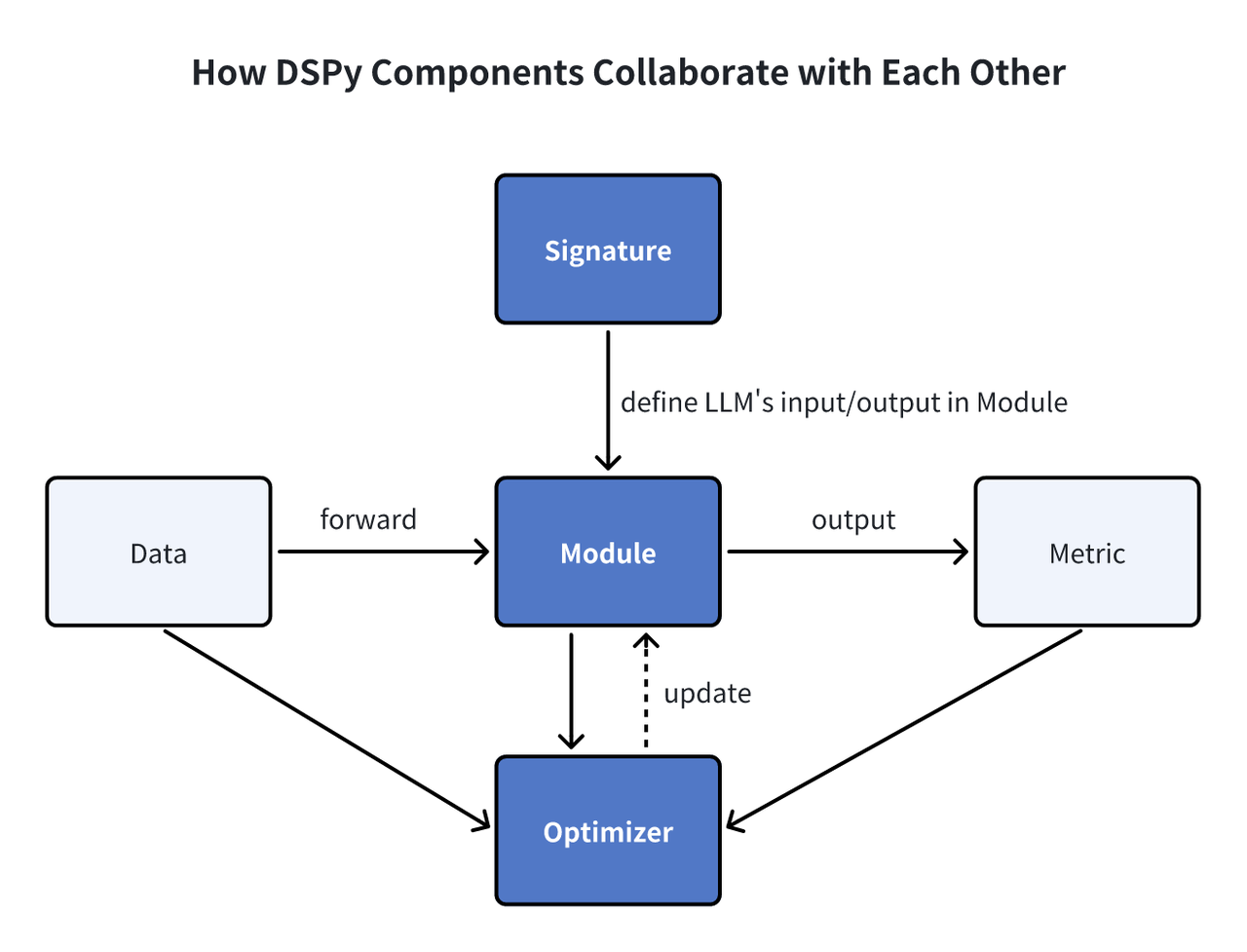 DSPy 模块
签名:DSPy 中的签名作为声明性规范,概述了模块的输入/输出行为,在任务执行中指导语言模型。 模块:DSPy 模块是利用语言模型(LM)的程序的基本组件。它们抽象了各种提示技术,如思维链或 ReAct,并可用于处理任何 DSPy Signature。凭借可学习的参数以及处理输入和产生输出的能力,这些模块可以组合成更大的程序,其灵感来源于 PyTorch 中的 NN 模块,但专为 LM 应用量身定制。 优化器:DSPy 中的优化器可对 DSPy 程序的参数(如提示和 LLM 权重)进行微调,以最大限度地提高指定指标(如准确性),从而提高程序效率。
为什么在 DSPy 中使用 Milvus
DSPy 是一个功能强大的编程框架,可促进 RAG 应用程序的发展。此类应用程序需要检索有用信息以提高答案质量,这就需要向量数据库。Milvus 是著名的开源向量数据库,可提高性能和可扩展性。有了 DSPy 中的检索模块 MilvusRM,集成 Milvus 就变得天衣无缝。现在,开发人员可以利用 Milvus 强大的向量搜索功能,使用 DSPy 轻松定义和优化 RAG 程序。这种合作结合了 DSPy 的编程能力和 Milvus 的搜索功能,使 RAG 应用程序更高效、更可扩展。
示例
现在,让我们通过一个快速示例来演示如何在 DSPy 中利用 Milvus 来优化 RAG 应用程序。
前提条件
在构建 RAG 应用程序之前,请安装 DSPy 和 PyMilvus。
$ pip install "dspy-ai[milvus]"
$ pip install -U pymilvus
如果使用的是 Google Colab,要启用刚安装的依赖项,可能需要**重启运行时**(点击屏幕上方的 "运行时 "菜单,从下拉菜单中选择 "重启会话")。
加载数据集
在本例中,我们使用 HotPotQA(一个复杂问答对的 Collection)作为训练数据集。我们可以通过 HotPotQA 类加载这些数据集。
from dspy.datasets import HotPotQA

# Load the dataset.
dataset = HotPotQA(
    train_seed=1, train_size=20, eval_seed=2023, dev_size=50, test_size=0
)

# Tell DSPy that the 'question' field is the input. Any other fields are labels and/or metadata.
trainset = [x.with_inputs("question") for x in dataset.train]
devset = [x.with_inputs("question") for x in dataset.dev]
将数据摄入 Milvus 向量数据库
将上下文信息摄入到用于向量检索的 Milvus Collection 中。该 Collection 应有一个embedding 字段和一个text 字段。在这种情况下,我们使用 OpenAI 的text-embedding-3-small 模型作为默认查询 Embedding Function。
import requests
import os

os.environ["OPENAI_API_KEY"] = "<YOUR_OPENAI_API_KEY>"
MILVUS_URI = "example.db"
MILVUS_TOKEN = ""

from pymilvus import MilvusClient, DataType, Collection
from dspy.retrieve.milvus_rm import openai_embedding_function

client = MilvusClient(uri=MILVUS_URI, token=MILVUS_TOKEN)

if "dspy_example" not in client.list_collections():
    client.create_collection(
        collection_name="dspy_example",
        overwrite=True,
        dimension=1536,
        primary_field_name="id",
        vector_field_name="embedding",
        id_type="int",
        metric_type="IP",
        max_length=65535,
        enable_dynamic=True,
    )
text = requests.get(
    "https://raw.githubusercontent.com/wxywb/dspy_dataset_sample/master/sample_data.txt"
).text

for idx, passage in enumerate(text.split("\n")):
    if len(passage) == 0:
        continue
    client.insert(
        collection_name="dspy_example",
        data=[
            {
                "id": idx,
                "embedding": openai_embedding_function(passage)[0],
                "text": passage,
            }
        ],
    )
定义 MilvusRM。
现在,您需要定义 MilvusRM。
from dspy.retrieve.milvus_rm import MilvusRM
import dspy

retriever_model = MilvusRM(
    collection_name="dspy_example",
    uri=MILVUS_URI,
    token=MILVUS_TOKEN,  # ignore this if no token is required for Milvus connection
    embedding_function=openai_embedding_function,
)
turbo = dspy.OpenAI(model="gpt-3.5-turbo")
dspy.settings.configure(lm=turbo)
构建签名
现在我们已经加载了数据,让我们开始为管道的子任务定义签名。我们可以确定简单的输入question 和输出answer ,但由于我们正在构建一个 RAG 管道,我们将从 Milvus 获取上下文信息。因此,我们将签名定义为context, question --> answer 。
class GenerateAnswer(dspy.Signature):
    """Answer questions with short factoid answers."""

    context = dspy.InputField(desc="may contain relevant facts")
    question = dspy.InputField()
    answer = dspy.OutputField(desc="often between 1 and 5 words")
我们在context 和answer 字段中加入了简短的描述,以便更清晰地定义模型将接收和应生成的内容。
构建管道
现在,让我们定义 RAG 管道。
class RAG(dspy.Module):
    def __init__(self, rm):
        super().__init__()
        self.retrieve = rm

        # This signature indicates the task imposed on the COT module.
        self.generate_answer = dspy.ChainOfThought(GenerateAnswer)

    def forward(self, question):
        # Use milvus_rm to retrieve context for the question.
        context = self.retrieve(question).passages
        # COT module takes "context, query" and output "answer".
        prediction = self.generate_answer(context=context, question=question)
        return dspy.Prediction(
            context=[item.long_text for item in context], answer=prediction.answer
        )
执行管道并获取结果
现在,我们已经构建了 RAG 管道。让我们试一试并获取结果。
rag = RAG(retriever_model)
print(rag("who write At My Window").answer)
Townes Van Zandt
我们可以评估数据集的定量结果。
from dspy.evaluate.evaluate import Evaluate
from dspy.datasets import HotPotQA

evaluate_on_hotpotqa = Evaluate(
    devset=devset, num_threads=1, display_progress=False, display_table=5
)

metric = dspy.evaluate.answer_exact_match
score = evaluate_on_hotpotqa(rag, metric=metric)
print("rag:", score)
优化管道
定义完程序后,下一步就是编译。这个过程会更新每个模块内的参数,以提高性能。编译过程取决于三个关键因素:
- 训练集:我们将利用训练数据集中的 20 个问答示例进行演示。
- 验证指标:我们将建立一个简单的
validate_context_and_answer指标。该指标可验证预测答案的准确性,并确保检索到的上下文包含答案。 - 特定优化器(提词器):DSPy 的编译器包含多个提词器,旨在有效优化您的程序。
from dspy.teleprompt import BootstrapFewShot

# Validation logic: check that the predicted answer is correct.# Also check that the retrieved context does contain that answer.

def validate_context_and_answer(example, pred, trace=None):
    answer_EM = dspy.evaluate.answer_exact_match(example, pred)
    answer_PM = dspy.evaluate.answer_passage_match(example, pred)
    return answer_EM and answer_PM

# Set up a basic teleprompter, which will compile our RAG program.
teleprompter = BootstrapFewShot(metric=validate_context_and_answer)

# Compile!
compiled_rag = teleprompter.compile(rag, trainset=trainset)

# Now compiled_rag is optimized and ready to answer your new question!
# Now, let’s evaluate the compiled RAG program.
score = evaluate_on_hotpotqa(compiled_rag, metric=metric)
print(score)
print("compile_rag:", score)
Ragas 分数从之前的 50.0 增加到 52.0,表明答案质量有所提高。
总结
DSPy 通过其可编程接口,促进了模型提示和权重的算法和自动优化,标志着语言模型交互的飞跃。利用 DSPy 实施 RAG,可轻松适应不同的语言模型或数据集,大大减少了繁琐的人工干预。