User、Privilege 与 Role
本主题概述了 Milvus 中基于角色的访问控制(RBAC),详细介绍了用户、角色、对象和权限之间的定义和关系。
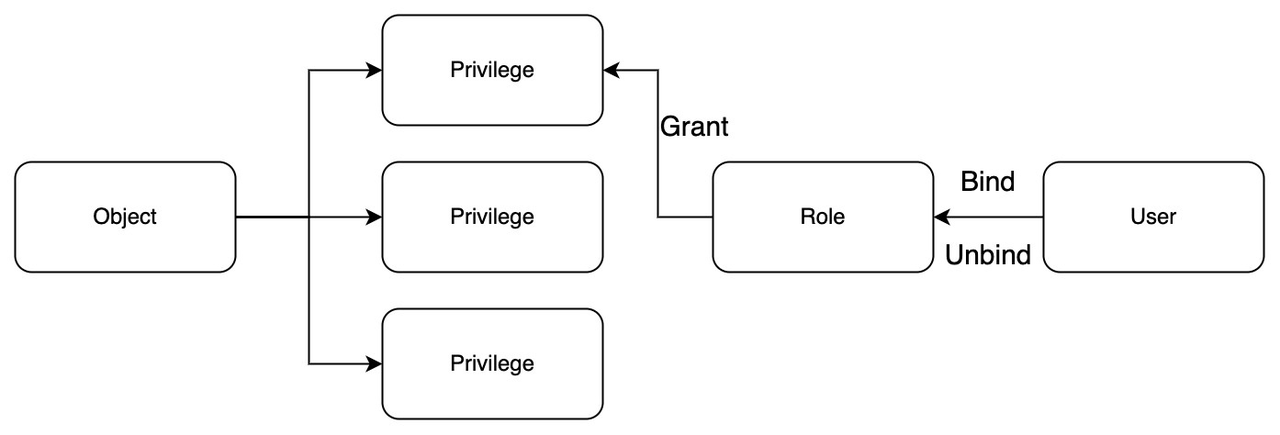
下图说明了对象、权限、角色和用户之间的关系。
关键概念
要管理对 Milvus 资源的访问控制,必须了解 RBAC 的关键组成部分:对象类型、对象名称、用户、角色和权限。
-
对象 类型:分配权限的对象类别。对象类型可以是
-
Global:全系统对象,允许用户执行影响所有 Collection、用户或全系统设置的操作。 -
Collection:特定于 Collection 的对象,允许用户执行创建索引、加载数据、插入或删除数据以及查询特定 Collection 中的数据等操作。 -
User:与用户管理相关的对象,允许用户管理数据库用户的凭证和角色,如更新用户凭证或查看用户详细信息。 -
对象名称:要控制访问的对象的具体名称。例如
-
如果对象类型为
Global,则必须将对象名称设置为通配符 (*),表示指定类型的所有对象。 -
如果对象类型是
Collection,对象名称就是一个 Collection 的名称。 -
如果对象类型为
User,对象名称就是数据库用户的名称。 -
用户:与 Milvus 交互的人或应用程序,由用户名和相应的密码组成。
-
权限:定义可执行的操作和可访问的资源。权限不直接授予用户,而是分配给角色。
-
角色:定义用户对某些对象所拥有的一系列权限。角色一旦与用户绑定,用户就会继承授予该角色的所有权限。
举例说明:授予 Privilege
下面的代码片段展示了如何在特定 Collection 上向角色授予 CreateIndex 权限:
- Python
- Java
- Node.js
- Go
- cURL
milvusClient.grant_privilege(
    role_name="CUSTOM_ROLE_NAME",
    object_type="Collection",  # Valid value: Global, Collection or User.
    privilege="CreateIndex",   # See the table below for valid privilege names and relevant API descriptions.
    object_name="YOUR_COLLECTION_NAME"  # The name of the collection to grant access to. Use "*" to grant access to all collections.
)
GrantPrivilegeReq grantPrivilegeReq = GrantPrivilegeReq.builder()
        .roleName("roleName")
        .objectName("CollectionName") // The name of the collection to grant access to. Use "*" to grant access to all collections.
        .objectType("Collection") // Valid value: Global, Collection or User.
        .privilege("CreateIndex") // See the table below for valid privilege names and relevant API descriptions.
        .build();
client.grantPrivilege(grantPrivilegeReq);
milvusClient.grantPrivilege({
   roleName: 'roleName',
   object: 'Collection',  // Valid value: Global, Collection or User.
   objectName: 'CollectionName', // The name of the collection to grant access to. Use "*" to grant access to all collections.
   privilegeName: 'CreateIndex' // See the table below for valid privilege names and relevant API descriptions.
 })
要获取权限相关 API 的更多信息,请参阅 grant_privilege 和 revoke _ privilege。
默认 User 和 Role
Milvus 默认创建一个 root 用户,默认密码为 Milvus。root 用户被授予 admin 权限,这意味着该 root 用户可以访问所有资源并执行所有操作。
如果用户与 public 角色相关联,则有权获得以下权限:
DescribeCollectionShowCollectionsIndexDetail
对象类型和 Privilege 列表
下表列出了 启用 RBAC 时可以选择的值。
| 对象类型 | 权限名称 | 客户端相关 API 说明 |
|---|---|---|
| Collection | CreateIndex | CreateIndex |
| Collection | DropIndex | DropIndex |
| Collection | IndexDetail | DescribeIndex/GetIndexState/GetIndexBuildProgress |
| Collection | Load | LoadCollection/GetLoadingProgress/GetLoadState |
| Collection | GetLoadingProgress | GetLoadingProgress |
| Collection | GetLoadState | GetLoadState |
| Collection | Release | ReleaseCollection |
| Collection | Insert | Insert |
| Collection | Delete | Delete |
| Collection | Upsert | Upsert |
| Collection | Search | Search |
| Collection | Flush | Flush/GetFlushState |
| Collection | GetFlushState | GetFlushState |
| Collection | Query | Query |
| Collection | GetStatistics | GetCollectionStatistics |
| Collection | Compaction | Compaction |
| Collection | Import | BulkInsert/Import |
| Collection | LoadBalance | LoadBalance |
| Collection | CreatePartition | CreatePartition |
| Collection | DropPartition | DropPartition |
| Collection | ShowPartitions | ShowPartitions |
| Collection | HasPartition | HasPartition |
| 全局 | 全局 | 该表中的所有 API 操作权限 |
| 全局 | CreateCollection | CreateCollection |
| 全局 | DropCollection | DropCollection |
| 全局 | DescribeCollection | DescribeCollection |
| 全局 | ShowCollections | ShowCollections |
| 全局 | RenameCollection | RenameCollection |
| 全局 | FlushAll | FlushAll |
| 全局 | CreateOwnership | 创建用户 创建角色 |
| 全局 | DropOwnership | 删除凭证 删除角色 |
| 全局 | SelectOwnership | SelectRole/SelectGrant |
| 全局 | ManageOwnership | 操作用户角色 操作权限 |
| 全局 | CreateResourceGroup | CreateResourceGroup |
| 全局 | DropResourceGroup | DropResourceGroup |
| 全局 | DescribeResourceGroup | DescribeResourceGroup |
| 全局 | ListResourceGroups | ListResourceGroups |
| 全局 | TransferNode | TransferNode |
| 全局 | TransferReplica | TransferReplica |
| 全局 | CreateDatabase | CreateDatabase |
| 全局 | DropDatabase | DropDatabase |
| 全局 | ListDatabases | ListDatabases |
| 全局 | CreateAlias | CreateAlias |
| 全局 | DropAlias | DropAlias |
| 全局 | DescribeAlias | DescribeAlias |
| 全局 | ListAliases | ListAliases |
| 用户 | UpdateUser | UpdateCredential |
| 用户 | SelectUser | SelectUser |
- 对象和权限名称区分大小写。
- 要向某类对象(如 Collection、Global、User)授予所有权限,请使用 "*"作为权限名称。
- 全局对象的权限名称 "*"不包括 All 权限,因为 All 权限包括所有权限,包括任何 Collection 和用户对象。
下一步
- 了解如何 启用 RBAC。