首个Nano-banana企业级多模态RAG教程,适合电商、游戏场景
最近全球刷屏Nano Banana,应该没有人还没用过吧?!
它不仅能根据一句话描述,就生成栩栩如生的手办图片,还能根据用户的描述,对图片进行精细化编辑,就连速度,也快得出奇。
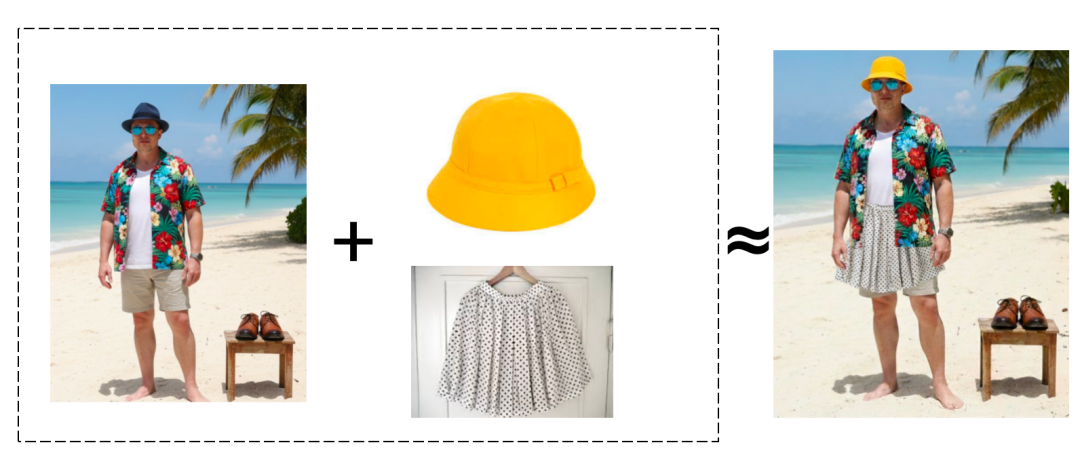
(指令:为马斯克换帽子和裙子。可以看到右图所有要素除了稍微漏了裤边之外,融合还算不错,甚至还贴心考虑到了穿裙子需要把短袖扎进去的细节,整个生成耗时仅16.0s。)
可以说,作为当下最优秀的生图模型,Nano Banana在一致性以及精细度上,已经做到了符合企业级生产标准。
比如,我们服务的一家集抽卡、换装于一体的娱乐公司,最近正在开发一个功能,通过接入Nano Banana,实现用户上传照片后,可以自由从素材库中选择喜欢的配饰、道具进行换装打扮。
一些电商客户,也在考虑用AI为模特换装、换发型、换配饰,实现一次拍摄,永久使用。
从这两个案例中,我们不难发现,对很多企业级用户来说,仅有一个不错的生图模型还不够。他们还需要足够聪明的检索,从海量历史素材中,找到最合适的服装、配饰、以及其他人物元素。
也就是说,用户需要的是一个集向量数据库+图片生成模型的多模态RAG系统。
那么,如何用Nano Banana+Milvus向量数据库,搭建这样一套生产级的多模态RAG系统?本文将给出手把手教程。
01
搭建以文搜图系统
对一些快消品公司以及游戏娱乐公司来说,用AI生图最大的问题不在于生成,而在于历史素材过多,但这些素材都是图像、音频、视频这样的非结构化数据。常规方法下,我们无法对其进行精准的检索召回。
因此,在这一步,我们需要先搭建一个完善的以文搜图系统。
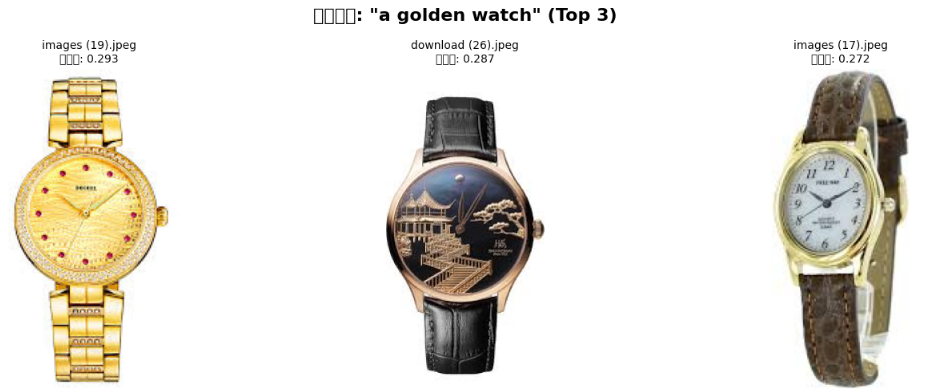
我们可以使用 CLIP 模型将图像和文本转为向量,然后将向量存储到 Milvus 数据库,最后通过 Milvus 向量数据库进行高效的相似性搜索(用户通过文字描述即可搜索图片,并返回 top 3 结果)。
以下是具体教程:
-
安装依赖包
# 安装必要的包
%pip install --upgrade pymilvus pillow matplotlib
%pip install git+https://github.com/openai/CLIP.git
-
导入必要的库
import os
import clip
import torch
from PIL import Image
import matplotlib.pyplot as plt
from pymilvus import MilvusClient
from glob import glob
import math
print("所有库导入成功!")
-
初始化Milvus客户端
# 初始化 Milvus 客户端
milvus_client = MilvusClient(uri="http://localhost:19530",token="root:Miluvs")
print("Milvus 客户端初始化成功!")
-
加载CLIP模型
# 加载 CLIP 模型
model_name = "ViT-B/32"
device = "cuda" if torch.cuda.is_available() else "cpu"
model, preprocess = clip.load(model_name, device=device)
model.eval()
print(f"CLIP 模型 '{model_name}' 加载成功,运行设备: {device}")
print(f"模型输入分辨率: {model.visual.input_resolution}")
print(f"上下文长度: {model.context_length}")
print(f"词汇表大小: {model.vocab_size}")

-
定义特征提取函数
def encode_image(image_path):
    """将图像编码为归一化的特征向量"""
    try:
        image = preprocess(Image.open(image_path)).unsqueeze(0).to(device)
        with torch.no_grad():
            image_features = model.encode_image(image)
            image_features /= image_features.norm(dim=-1, keepdim=True)  # 归一化
        return image_features.squeeze().cpu().tolist()
    except Exception as e:
        print(f"处理图像 {image_path} 时出错: {e}")
        return None
def encode_text(text):
    """将文本编码为归一化的特征向量"""
    text_tokens = clip.tokenize([text]).to(device)
    with torch.no_grad():
        text_features = model.encode_text(text_tokens)
        text_features /= text_features.norm(dim=-1, keepdim=True)  # 归一化
    return text_features.squeeze().cpu().tolist()
print("特征提取函数定义成功!")
-
创建Milvus集合
collection_name = "production_image_collection"
# 如果集合已存在,删除它
if milvus_client.has_collection(collection_name):
    milvus_client.drop_collection(collection_name)
    print(f"已删除现有集合: {collection_name}")
# 创建新集合
milvus_client.create_collection(
    collection_name=collection_name,
    dimension=512,  # CLIP ViT-B/32 的嵌入维度
    auto_id=True,   # 自动生成 ID
    enable_dynamic_field=True,  # 启用动态字段
    metric_type="COSINE"  # 使用余弦相似度
)
print(f"集合 '{collection_name}' 创建成功!")
print(f"集合信息: {milvus_client.describe_collection(collection_name)}")

-
处理并插入图像
# 设置图像目录路径
image_dir = "./production_image"
raw_data = []
# 获取所有支持的图像格式
image_extensions = ['*.jpg', '*.jpeg', '*.png', '*.JPEG', '*.JPG', '*.PNG']
image_paths = []
for ext in image_extensions:
    image_paths.extend(glob(os.path.join(image_dir, ext)))
print(f"在 {image_dir} 中找到 {len(image_paths)} 张图像")
# 处理图像并生成嵌入
successful_count = 0
for i, image_path in enumerate(image_paths):
    print(f"处理进度: {i+1}/{len(image_paths)} - {os.path.basename(image_path)}")
    image_embedding = encode_image(image_path)
    if image_embedding is not None:
        image_dict = {
            "vector": image_embedding,
            "filepath": image_path,
            "filename": os.path.basename(image_path)
        }
        raw_data.append(image_dict)
        successful_count += 1
print(f"成功处理 {successful_count} 张图像")


-
将数据插入Milvus
# 将数据插入 Milvus
if raw_data:
    print("正在将数据插入 Milvus...")
    insert_result = milvus_client.insert(collection_name=collection_name, data=raw_data)
    print(f"成功插入 {insert_result['insert_count']} 张图像到 Milvus")
    print(f"插入的 ID 示例: {insert_result['ids'][:5]}...")  # 显示前5个ID
else:
    print("没有成功处理的图像数据可插入")

-
定义搜索和可视化函数
def search_images_by_text(query_text, top_k=3):
    """根据文本查询搜索图像"""
    print(f"搜索查询: '{query_text}'")
    # 编码查询文本
    query_embedding = encode_text(query_text)
    # 在 Milvus 中搜索
    search_results = milvus_client.search(
        collection_name=collection_name,
        data=[query_embedding],
        limit=top_k,
        output_fields=["filepath", "filename"]
    )
    return search_results[0]
def visualize_search_results(query_text, results):
    """可视化搜索结果"""
    num_images = len(results)
    if num_images == 0:
        print("没有找到匹配的图像")
        return
    # 创建子图
    fig, axes = plt.subplots(1, num_images, figsize=(5*num_images, 5))
    fig.suptitle(f'搜索结果: "{query_text}" (Top {num_images})', fontsize=16, fontweight='bold')
    # 处理单个图像的情况
    if num_images == 1:
        axes = [axes]
    # 显示图像
    for i, result in enumerate(results):
        try:
            img_path = result['entity']['filepath']
            filename = result['entity']['filename']
            score = result['distance']
            # 加载并显示图像
            img = Image.open(img_path)
            axes[i].imshow(img)
            axes[i].set_title(f"{filename}\n相似度: {score:.3f}", fontsize=10)
            axes[i].axis('off')
            print(f"{i+1}. 文件: {filename}, 相似度分数: {score:.4f}")
        except Exception as e:
            axes[i].text(0.5, 0.5, f'加载图像出错\n{str(e)}',
                        ha='center', va='center', transform=axes[i].transAxes)
            axes[i].axis('off')
    plt.tight_layout()
    plt.show()
print("搜索和可视化函数定义成功!")
10.执行文本搜索图像
# 示例搜索 1
query1 = "a golden watch"
results1 = search_images_by_text(query1, top_k=3)
visualize_search_results(query1, results1)

02
用Nano-banana
为品牌创作宣传图
安装Google SDK
%pip install google-generativeai
%pip install requests
print("Google Generative AI SDK 安装完成!")
配置Gemini API
import google.generativeai as genai
from PIL import Image
from io import BytesIO
genai.configure(api_key="<your_api_key>")
生成新图像
prompt = (
    "An European male model wearing a suit, carrying a gold watch."
)
image = Image.open("/path/to/image/watch.jpg")
model = genai.GenerativeModel('gemini-2.5-flash-image-preview')
response = model.generate_content([prompt, image])
for part in response.candidates[0].content.parts:
    if part.text is not None:
        print(part.text)
    elif part.inline_data is not None:
        image = Image.open(BytesIO(part.inline_data.data))
        image.save("generated_image.png")
        image.show()

03 效果演示
除了上文展示的场景,我们不妨把脑洞再放大,比如某品牌发布了很多新品,又不想重新找模特进行拍摄,就可以靠Nano-banana直接搞定宣传图
Prompt: A model is wearing these products on the beach
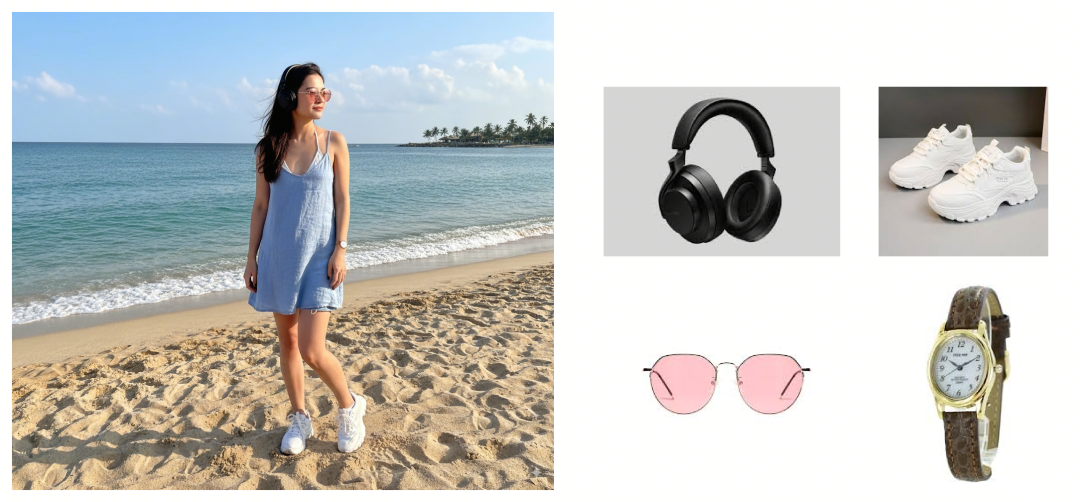
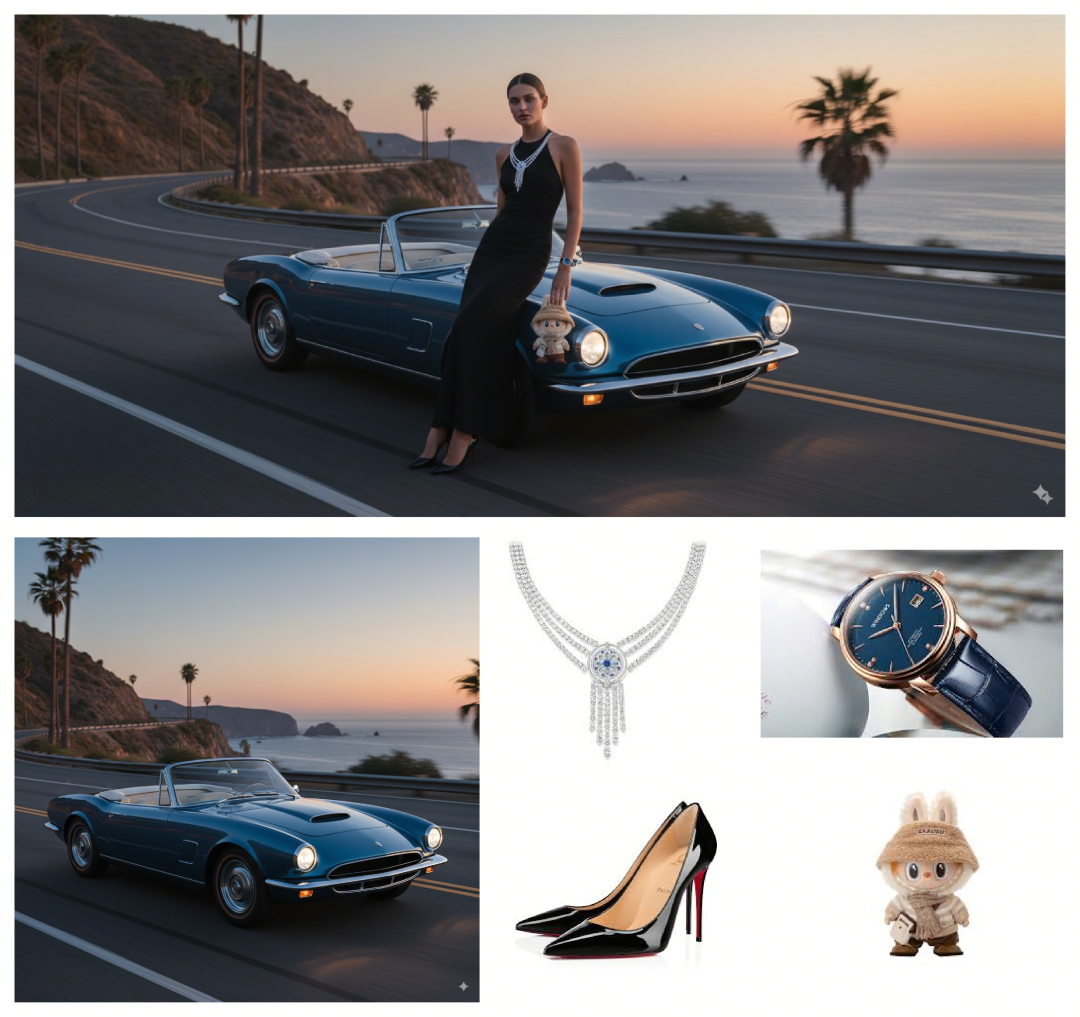
除了简单场景,我们也能实现一些天马行空的,随意叠加的场景,物品,人物。
Prompt: A model is posing and leaning against a blue convertible sports car. She is wearing a halter top dress and the accompanying accessories. She is adorned with a diamond necklace and a blue watch, wearing high heels on her feet and holding a labubu pendant in her hand.
最后就是最常见的手办原型制作,比如我们最近想做一些可爱的手办,就可以先让nano banana先来代劳。
Prompt: Use the nano-banana model to create a 1/7 scale commercialized figure of thecharacter in the illustration, in a realistic styie and environment.Place the figure on a computer desk, using a circular transparent acrylic base
without any text.On the computer screen, display the ZBrush modeling process of the figure.Next to the computer screen, place a BANDAl-style toy packaging box printedwith the original artwork.
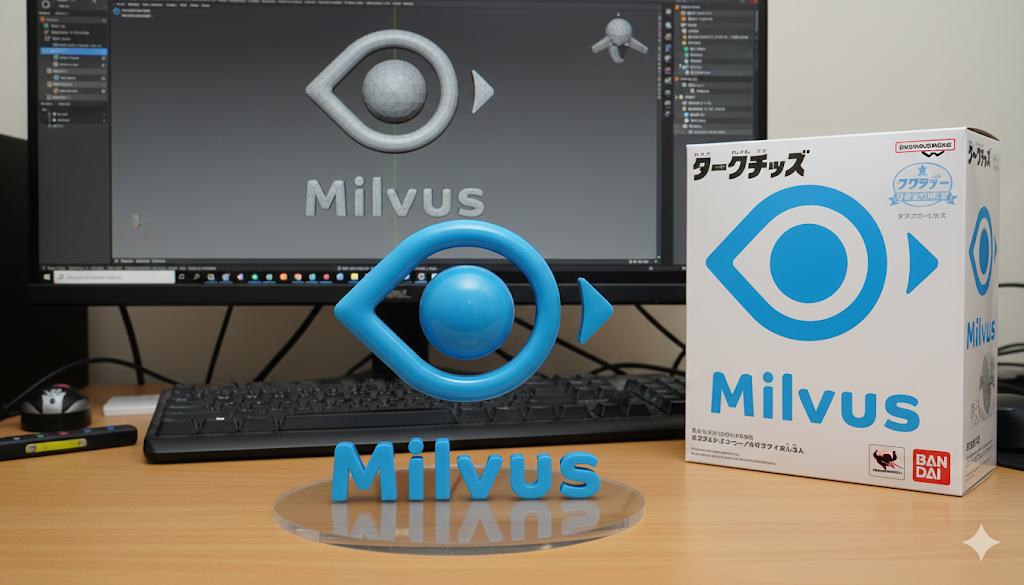
整体测评下来,我们发现Nano-banana完全担得起当下最强AI生图模型的称号。不仅做到了高一致性、微调的可控性,甚至能兼顾到水中倒影,产品模型图与实物图、包装logo图需要统一的魔鬼细节。
但Nano-banana并非完美无缺,在一些非常专业的场景中,依然会出现复杂指令理解失误或者光影不科学的小问题。我们可以考虑在提示词外,给AI一些想要的风格参考,或者对光源来源、光影效果给出具体描述,这样可以事半功倍哦。
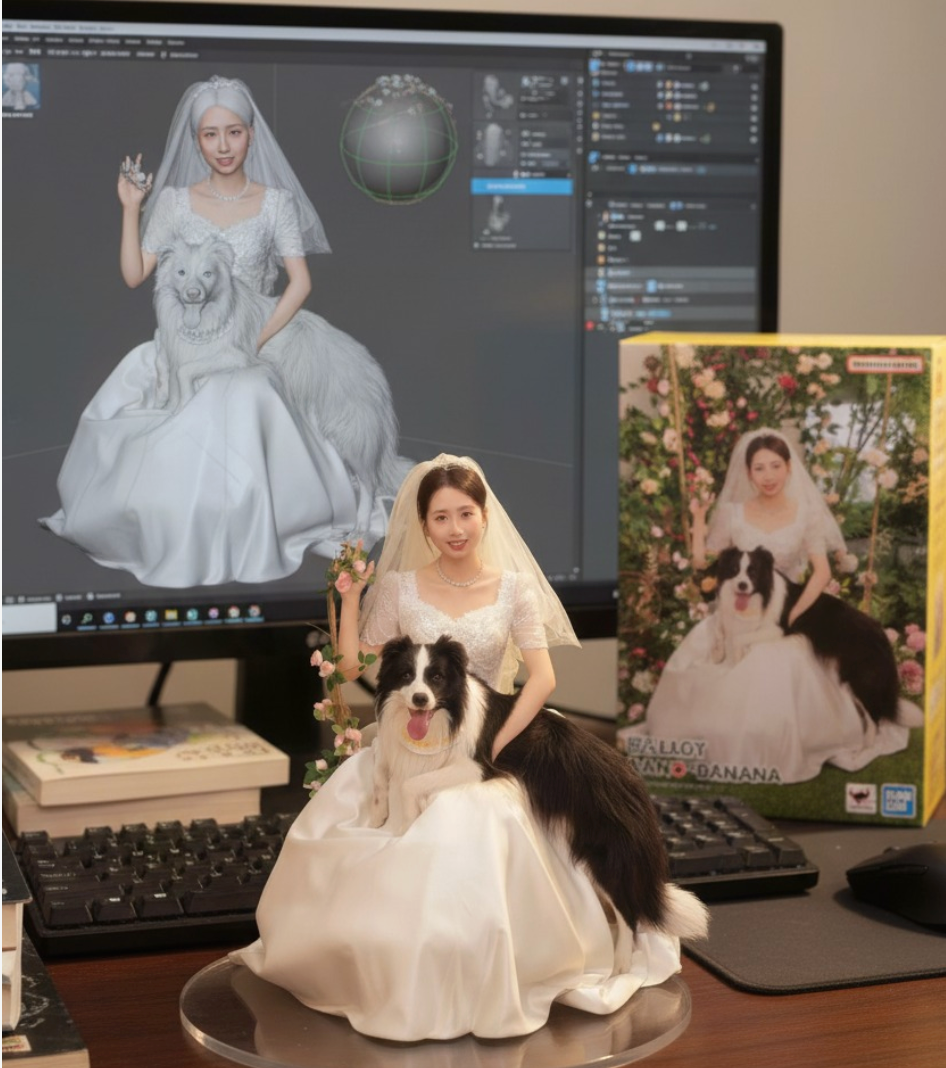
(彩蛋:这是我用Nano Banana给自己做的一个和小狗的合照手办,虽然七夕结束了,但大家不妨考虑用这个给女朋友一个惊喜)